
2. COMMAND SET
2.1: Copley ASCII Message Format
The syntax of a Copley ASCII message is:
[<optional node ID>] <command code> [<command specific parameters>...] <CR>
where:
•[<optional node ID>] is the CAN node address of an amplifier in a multi-drop network. Range is 0 127. The node ID is followed by a single space.
• <command code> is the single-letter code for one of the Copley ASCII commands described below. It is followed by a single space, or, in the case of the Reset command, a carriage return character.
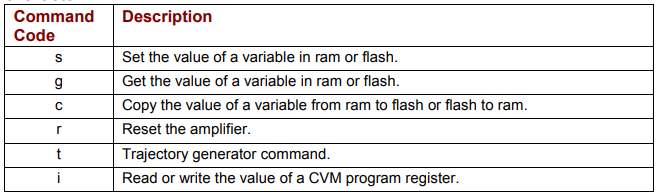
• <command specific parameters> tell the command what to act on and how. If more than one parameter is required, they should be separated by spaces.
• <cr> is a carriage return character that ends the command line.
For multi-axis amplifiers, see Copley ASCII Message Format for Multi-Axis Drives (p. 19).
2.2: Set (s) Command
The s command is used to set values of writeable amplifier variables.
The syntax of the s command is:
[ optional node ID] s <memory bank><variable ID> <value>...]<CR>
where:
• [optional node ID] is the CAN node address of an amplifier in a multi-drop network.
Range is 0-127. It is followed by a single space.
• s is the Set command code. It is followed by a single space.
• <memory bank> identifies which memory bank to set the variable in.
f = flash memory
r = RAM memory
• <variable ID> identifies the variable to set. Variable ID format can be decimal or hexadecimal.
• <value> is the new value(s) to be set in the variable. Value can be sent in integer or
hexadecimal format. If multiple values are required, they are separated by spaces.
<CR> is a carriage return character which immediately follows the last value.
The amplifier responds to the s command with:
• ok<CR> if the command is accepted.
• e <error #><CR> if the command was not accepted. See Error Codes (p. 77)