
8. CAN NETWORK CONFIGURATION
A CANopen network can support up to 127 nodes. Each node must have a unique and valid seven-bit address (Node ID) in the range of 1-127. (Address 0 should only be used when the amplifier is serving as a CME 2 serial port multi-drop gateway.)
If the amplifier is under DeviceNet control, see Copley DeviceNet Programmer’s Guide
Configure a CAN interface
1 Verify that the CAN network has been cabled and terminated as per amplifier documents.
2  Click CAN Configuration to open the CAN Configuration screen. (If CAN is not the Position Loop Input, choose AmplifierNetwork Configuration instead.)
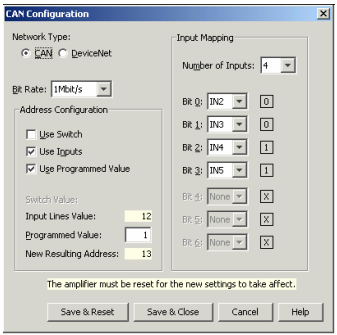
(Note that options may vary based on amplifier model and configuration.)
3 Choose network type (CAN or DeviceNet).
4 Choose a Bit Rate and choose any combination of address sources (Switch, Inputs, and Programmed Value). The address is the sum of the values from these sources.
5 For each source selected, perform the additional steps described below.

6 Click Save & Reset to save changes to amplifier flash, close the screen, and reset the amplifier. Click Save & Close to save changes to amplifier flash without resetting.
NOTE: Address and bit rate changes take effect only after power-up or reset.