
6. Introduction to Commands
6.1 Motion commands
The list of motion commands is shown in Figure 6-1.
Figure 6-1 List of motion commands
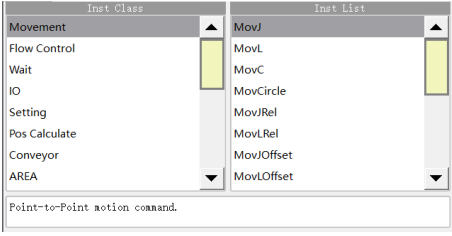
MovJ - Point-to-point motion command
It indicates that each joint of the robot performs point-to-point motion. The end trajectory of the robot is an irregular curve, and the IO command can be operated when the command operates to an end, as shown in Figure 6-2.
Figure 6-2 Parameter editing interface of MovJ
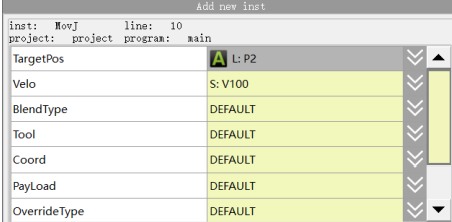
Target position: The final position of the command.
− When set to "APOS", the coordinates of each axis in joint space.
− When set to "CPOS", the position of the TCP point in the Cartesian coordinates. The target position depends on the configuration of confdata. If the mode parameter is set to -1, the end position is not limited by the value of confdata, but the optimal solution to the destination.
Target speed: The running speed of command.
− When setting it to “DEFAULT”, the default value V4000 will be used.
− When it is set to SPEED variable, you can select the system pre-defined one, or create it by yourself; the item per controls the MovJ command, which is the percentage of the global speed.
Transition type: The way of transition when the robot approaches the endpoint.
− DEFAULT: Default, i.e. no transition parameter is set in the command. If the SetBlendParam parameter is used in the program, the transition mode operates as per the globally set transition parameter.
− FINE: Equivalent in effect to DEFAULT.
− RELATIVE: Relative transition. The transition parameter is a relative value that represents the percentage of the distance from the transition point to the path endpoint relative to the full length of the path.
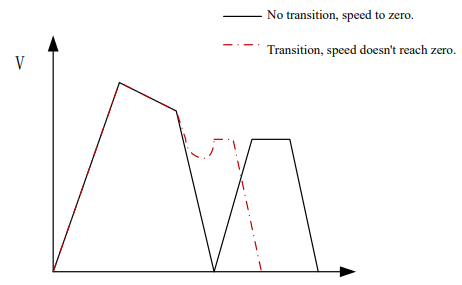
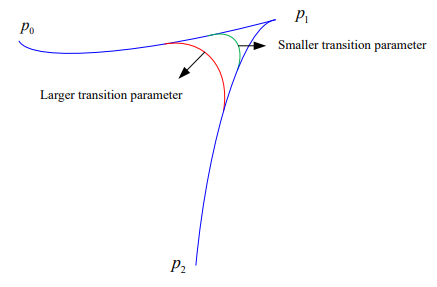
− ABSOLUTE: Absolute transition. The transition parameter is an absolute value that represents the distance from the transition point to the endpoint of path.
MovL - Linear motion command
MovL is the linear motion command, through which the TCP point of the robot can be moved linearly to the target position at the set speed. If the start and end postures of the motion differ, then during operation the posture will synchronously rotate to the ending posture along with the position. It is the same as MovJ. An additional IO operation can be performed when the command is executed. The parameter setting of MovL is similar to MovJ, but its target speed is an absolute speed value, rather than the percentage.
Figure 6-3 Parameter editing interface of MovL
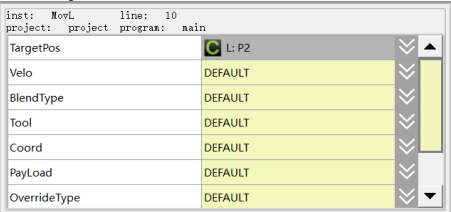
Target Position: The commanded ending position, which can be of type APOS or CPOS. Select an existing point in the drop-down list or create and teach a new variable in the pop-up dialog.
Target speed: The running speed of command.
− When setting it to “DEFAULT”, the default value V4000 will be used.
− When it is set to SPEED variable, you can select the system pre-defined one, or create it by yourself; the item per controls the MovJ command, which is the percentage of the global speed.
Transition type: The way of transition when the robot approaches the endpoint.
− DEFAULT: Default, i.e. no transition parameter is set in the command. If the SetBlendParam parameter is used in the program, the transition operates according to the globally set transition parameter.
− FINE: Equivalent in effect to DEFAULT.
− RELATIVE: Relative transition, where the transition parameter is a relative value that represents the distance from the transition point to the end of the track as a percentage of the full trajectory path.
− ABSOLUTE: Absolute transition, where the transition parameter is an absolute value indicating the distance from the transition point to the endpoint of path.
Transition Value: The transition value when the robot approaches the endpoint.
− When setting it to “DEFAULT”, the default value C100 will be used.
− When it is set to ZONE variable, you can select the system pre-defined one, or create it by yourself; it means no transition when the variable value is 0; the greater the transition value, the larger the transition radius.
Tool Parameters: The tool parameters used when the robot executes the path.
− When setting it to “DEFAULT”, the tool parameters set last time will be continuously used.
− When it is set to TOOL variable, you can select the system pre-defined one, or create it by yourself.
When using a coordinate system different from the current tool parameters, the system will switch the tool parameters to the set ones. If the tool parameters of the path of current segment and the preceding/next segments change, the transition will not be supported.
Coordinate System Parameters: The coordinate system parameters used by the robot when executing the path.
− When setting it to “DEFAULT”, the tool coordinate system set last time will be continuously used.
− When it is set to USERCOOR variable, you can select the system pre-defined one, or create it by yourself. When a coordinate system different from the current one is used, the system will switch the coordinate system to the set one.
Workpiece load: The workpiece load parameter used by the robot when executing the path.
− It is set to “DEFAULT”, which means to continue to use the workpiece load parameters set last time.
− When it is set to PAYLOAD variable, you can select the system pre-defined one, or create it by yourself; when a load parameter different from the current workpiece load parameter is used, the system will switch the workpiece load parameter to the set parameter. If the tool parameters of the path of current segment and the preceding/next segments change, the transition will not be supported.
Rate type: Whether the robot's commanded speed is affected by the global multiplier of the programming pendant when executing this path.
− DEFAULT: Same as GOVRON, i.e. the commanded speed is affected by the global multiplier of the programming pendant.
− GOVRON: The commanded speed is affected by the global multiplier of the programming pendant.
− GOVROFF: The commanded speed is not affected by the global multiplier of the programming pendant.
AddDo: The robot can perform IO operation after executing this command.
− NULL: No operation.
− IO commands: Executing IO operation. The IO commands currently available are SetDo, SetAo, SetSimDo, SetSimAo, PulseOut, PulseSimOut, SetDO8421, SetSimDO8421, SetDIEdge, and SetSimDIEdge.
MovC - Arc motion command
Arc command refers to the circular motion made by the robot’s TCP point from the starting position to the target by passing through the middle position. If the start and end postures of the motion are different, the posture will rotate to the end posture synchronously with the position, but it may not necessarily pass through the middle position.
Figure 6-4 Parameter editing interface of MovC
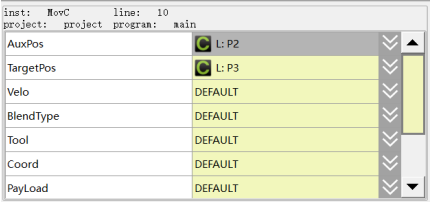
Middle position: The position of the auxiliary point in the middle of the arc.
Target position: The final position of the arc.
Target speed: The running speed of command.
− When setting it to “DEFAULT”, the default value V4000 will be used.
− When it is set to SPEED variable, you can select the system pre-defined one, or create it by yourself.
Transition type: The way of transition when the robot approaches the endpoint.
− DEFAULT: Default, i.e. no transition parameter is set in the command. If the SetBlendParam parameter is used in the program, the transition mode operates as per the globally set transition parameter.
− FINE: Equivalent in effect to DEFAULT.
− RELATIVE: Relative transition. The transition parameter is a relative value that represents the percentage of the distance from the transition point to the path endpoint relative to the full length of the path.
− ABSOLUTE: Absolute transition. The transition parameter is an absolute value that represents the distance from the transition point to the endpoint of path.
Transition Value: The transition value when the robot approaches the endpoint.
− When setting it to “DEFAULT”, the default value C100 will be used.
− When it is set to ZONE variable, you can select the system pre-defined one, or create it by yourself; it means no transition when the variable value is 0; the greater the transition value, the larger the transition radius.
Tool Parameters: The tool parameters used when the robot executes the path.
− When setting it to “DEFAULT”, the tool parameters set last time will be continuously used.
− When it is set to TOOL variable, you can select the system pre-defined one, or create it by yourself.
When using a coordinate system different from the current tool parameters, the system will switch the tool parameters to the set ones. If the tool parameters of the path of current segment and the preceding/next segments change, the transition will not be supported.
Coordinate System Parameters: The coordinate system parameters used by the robot when executing the path.
− When setting it to “DEFAULT”, the tool coordinate system set last time will be continuously used.
− When it is set to USERCOOR variable, you can select the system pre-defined one, or create it by yourself. When a coordinate system different from the current one is used, the system will switch the coordinate system to the set one.
− When it is set to external tool coordinates, the motion of robot is relative to the external tool coordinates, and the target speed of command is relative to the external tool coordinates. External TCP functions support only the transition between the reference coordinate system is the same external tool coordinates.
− When setting it to the positioner coordinates, the robot’s motion is relative to the positioner coordinates, and the target speed of command is relative to the positioner flange. The POSITIONER function supports only the transition between the same positioner.
Workpiece load: The workpiece load parameter used by the robot when executing the path.
− It is set to “DEFAULT”, which means to continue to use the workpiece load parameters set last time.
− When it is set to PAYLOAD variable, you can select the system pre-defined one, or create it by yourself; when a load parameter different from the current workpiece load parameter is used, the system will switch the workpiece load parameter to the set parameter. If the tool parameters of the path of current segment and the preceding/next segments change, the transition will not be
supported.
Rate type: Whether the robot's commanded speed is affected by the global multiplier of the programming pendant when executing this path.
− DEFAULT: Same as GOVRON, i.e. the commanded speed is affected by the global multiplier of the programming pendant.
− GOVRON: The commanded speed is affected by the global multiplier of the programming pendant.
− GOVROFF: The commanded speed is not affected by the global multiplier of the programming pendant.
AddDo: The robot can perform IO operation after executing this command.
− NULL: No operation.
− IO Command: Executing IO operation.
Figure 6-5 Key points of MovC arc
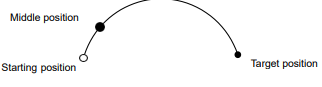
This command must satisfy:
When the end of the robot TCP performs a full circular motion, two MovC commands must be executed or the MovCircle command must be used.
MovCircle - Circular motion command
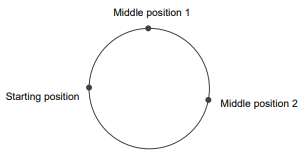
MovCircle command means that the robot TCP point moves in a full circle from the start position to the start position through the auxiliary point 1 and auxiliary point 2 positions, with the pose remaining constant during the movement.
Figure 6-6 Parameter editing interface of MovCircle
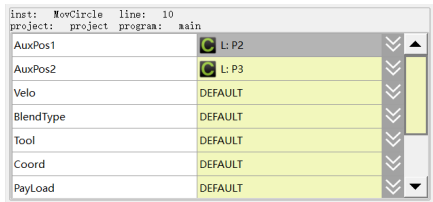
Middle Position 1: The position 1 of the middle auxiliary point of the full circle, which is used to determine the size and movement direction of the arc. The pose of this point will not affect the final trajectory.
Middle Position 2: The position 2 of the middle auxiliary point of the full circle, which is used to determine the size and movement direction of the arc. The pose of this point will not affect the final trajectory.
Target speed: The running speed of command.
− When setting it to “DEFAULT”, the default value V4000 will be used.
− When it is set to SPEED variable, you can select the system pre-defined one, or create it by yourself.
Transition type: The way of transition when the robot approaches the endpoint.
− DEFAULT: Default, i.e. no transition parameter is set in the command. If the SetBlendParam parameter is used in the program, the transition operates according to the globally set transition parameter.
− FINE: Equivalent in effect to DEFAULT.
− RELATIVE: Relative transition, where the transition parameter is a relative value that represents the distance from the transition point to the end of the track as a percentage of the full trajectory path.
− ABSOLUTE: Absolute transition, where the transition parameter is an absolute value indicating the distance from the transition point to the endpoint of path.
Transition Value: The transition value when the robot approaches the endpoint.
− When setting it to “DEFAULT”, the default value C100 will be used.
− When it is set to ZONE variable, you can select the system pre-defined one, or create it by yourself; it means no transition when the variable value is 0; the greater the transition value, the larger the transition radius.
Tool Parameters: The tool parameters used when the robot executes the path.
− When setting it to “DEFAULT”, the tool parameters set last time will be continuously used.
− When it is set to TOOL variable, you can select the system pre-defined one, or create it by yourself.
When using a coordinate system different from the current tool parameters, the system will switch the tool parameters to the set ones. If the tool parameters of the path of current segment and the preceding/next segments change, the transition will not be supported.
Coordinate System Parameters: The coordinate system parameters used by the robot when executing the path.
− When setting it to “DEFAULT”, the tool coordinate system set last time will be continuously used.
− When it is set to USERCOOR variable, you can select the system pre-defined one, or create it by yourself. When a coordinate system different from the current one is used, the system will switch the coordinate system to the set one.
− When it is set to external tool coordinates, the motion of robot is relative to the external tool coordinates, and the target speed of command is relative to the external tool coordinates. External TCP functions support only the transition between the reference coordinate system is the same external tool coordinates.
− When setting it to the positioner coordinates, the robot’s motion is relative to the positioner coordinates, and the target speed of command is relative to the positioner flange. The POSITIONER function supports only the transition between the same positioner.
Workpiece load: The workpiece load parameter used by the robot when executing the path.
− It is set to “DEFAULT”, which means to continue to use the workpiece load parameters set last time.
− When it is set to PAYLOAD variable, you can select the system pre-defined one, or create it by yourself; when a load parameter different from the current workpiece load parameter is used, the system will switch the workpiece load parameter to the set parameter. If the tool parameters of the path of current segment and the preceding/next segments change, the transition will not be supported.
Rate type: Whether the robot’s commanded speed is affected by the global multiplier of the programming pendant when executing this path.
− DEFAULT: Same as GOVRON, i.e. the commanded speed is affected by the global multiplier of the programming pendant.
− GOVRON: The commanded speed is affected by the global multiplier of the programming pendant.
− GOVROFF: The commanded speed is not affected by the global multiplier of the programming pendant.
AddDo: The robot can perform IO operation after executing this command.
− NULL: No operation.
− IO Command: Executing IO operation.
Figure 6-7 Key points of MovCircle full circle
MovJHand – Left and Right Hand Motion Commands
This motion instruction is used to move the joints (point to point) to the end position with the specified left and right hand systems, and is only applicable to SCARA models.
Difference between this instruction and Hand instruction.
The Hand instruction is a setup instruction. After the Hand instruction is run, the subsequent motion instructions (e.g., MovJ) move with the hand system it sets up; the MovJHand instruction is a motion instruction.
MovJHand is a motion instruction that performs PTP motion with the hand system specified in the instruction.
If Hand (e.g. lefty) instruction is followed by MovJHand (P1, e.g. Righty), this MovJHand moves in the right hand system.
Figure 6-8 MovJHand Parameter Editing Interface
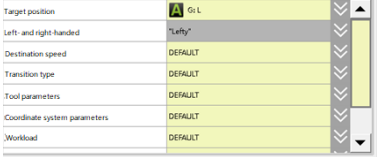
Target position: the end position of the instruction.
- When "APOS" is set, the coordinate value of each axis in the joint space.
- When "CPOS" is set, the position of TCP point in Cartesian coordinate system. The target position depends on the configuration of confdata. If the value of mode parameter is set to -1, the end position is not limited by the value of confdata, and the destination is reached by the optimal solution.
Left- and right-handed settings: left- and right-handed type mode for the end position.
- Lefty: left hand setting.
- Righty: right hand setting.
- Change: The opposite of the point position mode hand system.
Destination speed: The speed at which the command runs.
- Setting to "DEFAULT" indicates that the default value of V4000 is used.
- If you set it as a SPEED variable, you can choose the system predefined value or create your own.
Transition type: the type of transition when the robot approaches the end point.
- DEFAULT: Default, i.e. no transition parameter is set in the instruction. If the global transition parameter (SetBlendParam) is used in the program, the transition method runs according to the globally set transition parameter.
- FINE: the effect is the same as DEFAULT.
- RELATIVE: Relative transition, the transition parameter is a relative value, indicating the percentage of the distance from the transition point to the end of the trajectory relative to the length of the whole section of the trajectory.
- ABSOLUTE: Absolute transition, the transition parameter is an absolute value, indicating the distance from the transition point to the end of the trajectory.
Transition value: the transition value when the robot is approaching the end point.
- Set to "DEFAULT" to use the default value of C100.
- If the value is set to "ZONE", it can be predefined by the system or created by yourself; where: when the value of the variable is 0, it means that there is no transition, and the larger the transition value is, the larger the transition radius is.
Workload: the workload parameter used by the robot to execute the trajectory.
- Setting it to "DEFAULT" means that the most recent workload parameter is used.
- When set as PAYLOAD variable, it can be predefined by the system or created by yourself; if you use a load parameter different from the current workpiece load parameter, the system will switch the workpiece load parameter to the set workpiece load parameter. The system will switch the workpiece load parameter to the set workpiece load parameter when using a load parameter that is different from the current workpiece load parameter.
AddDo: The robot performs IO operation after executing this instruction.
MovJRel - Relative offset command
The MovJ interpolation relative offset command. It works by taking the current robot position or the target position of the previous motion command as the starting point, and then perform the robot motion operation.
Unlike the commands such as MovJ, the target relative position value used by this command cannot be obtained through teaching. User needs to create a new joint relative position variable in the list of variables before, and then select it from the drop-down list.
Figure 6-9 Parameter editing interface of MovJRel
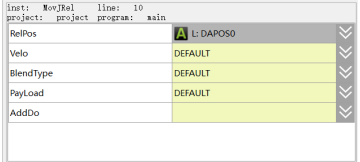
Target Relative Position: The position increment the robot will move when executing this command.
Target speed: The running speed of command.
− When setting it to “DEFAULT”, the default value V4000 will be used.
− When it is set to SPEED variable, you can select the system pre-defined one, or create it by yourself.
Transition type: The way of transition when the robot approaches the endpoint.
− DEFAULT: Default, i.e. no transition parameter is set in the command. If the SetBlendParam parameter is used in the program, the transition mode operates as per the globally set transition parameter.
− FINE: Equivalent in effect to DEFAULT.
− RELATIVE: Relative transition. The transition parameter is a relative value that represents the percentage of the distance from the transition point to the path endpoint relative to the full length of the path.
− ABSOLUTE: Absolute transition. The transition parameter is an absolute value that represents the distance from the transition point to the endpoint of path.
Transition Value: The transition value when the robot approaches the endpoint.
− When setting it to “DEFAULT”, the default value C100 will be used.
− When it is set to ZONE variable, you can select the system pre-defined one, or create it by yourself; it means no transition when the variable value is 0; the greater the transition value, the larger the transition radius.
Workpiece load: The workpiece load parameter used by the robot when executing the path.
− It is set to “DEFAULT”, which means to continue to use the workpiece load parameters set last time.
− When it is set to PAYLOAD variable, you can select the system pre-defined one, or create it by yourself; when a load parameter different from the current workpiece load parameter is used, the system will switch the workpiece load parameter to the set parameter. If the tool parameters of the path of current segment and the preceding/next segments change, the transition will not be supported.
AddDo: Robot will perform IO operation after executing this command.
MovLRel-Interpolation relative offset command
The MovJ interpolation relative offset command. It works by taking the current robot position or the target position of the previous motion command as the starting point, and then performs an offset motion relative to the coordinate system or tool.
Unlike the commands such as MovL, the target relative position value used by this command cannot be obtained through teaching. User needs to create a new joint relative position variable in the list of variables before, and then select it from the drop-down list.
Figure 6-10 Parameter editing interface of MovJRel
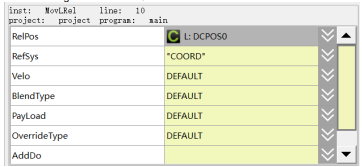
Target Relative Position: The position increment the robot will move when executing this command.
Reference Coordinates: coordinate system offset or tool offset selection;
− Coord: offset relative to the current user coordinates;
− Tool: offset relative to the tool coordinates, i.e. translation or rotation with reference to Tx, Ty, Tz.
Target speed: The running speed of command.
− When setting it to “DEFAULT”, the default value V4000 will be used.
− When it is set to SPEED variable, you can select the system pre-defined one, or create it by yourself.
Transition type: The way of transition when the robot approaches the endpoint.
− DEFAULT: Default, i.e. no transition parameter is set in the command. If the SetBlendParam parameter is used in the program, the transition mode operates as per the globally set transition parameter.
− FINE: Equivalent in effect to DEFAULT.
− RELATIVE: Relative transition. The transition parameter is a relative value that represents the percentage of the distance from the transition point to the path endpoint relative to the full length of the path.
− ABSOLUTE: Absolute transition. The transition parameter is an absolute value that represents the distance from the transition point to the endpoint of path.
Transition Value: The transition value when the robot approaches the endpoint.
− When setting it to “DEFAULT”, the default value C100 will be used.
− When it is set to ZONE variable, you can select the system pre-defined one, or create it by yourself; it means no transition when the variable value is 0; the greater the transition value, the larger the transition radius.
Workpiece load: The workpiece load parameter used by the robot when executing the path.
− It is set to “DEFAULT”, which means to continue to use the workpiece load parameters set last time.
− When it is set to PAYLOAD variable, you can select the system pre-defined one, or create it by yourself; when a load parameter different from the current workpiece load parameter is used, the system will switch the workpiece load parameter to the set parameter. If the tool parameters of the path of current segment and the preceding/next segments change, the transition will not be supported.
Rate type: Whether the robot’s commanded speed is affected by the global multiplier.
− DEFAULT: Same as GOVRON, i.e. the commanded speed is affected by the global multiplier of the programming pendant.
− GOVRON: The commanded speed is affected by the global multiplier of the programming pendant.
− GOVROFF: The commanded speed is not affected by the global multiplier of the programming pendant.
AddDo: Robot will perform IO operation after executing this command.
MovJOffset – Offset motion command of joint space
In contrast to the MovLOffset command, the MovJOffset command performs offset motion with MovJ motion and the target relative position supports both types of DAPOS and DCPOS.
In contrast to the MovJRel command, the starting position specified by the MovJOffset command is not limited to the position of the current robot or the target position of the previous motion command, and can be offset relative to the coordinates or tool.
Figure 6-11 Parameter editing interface of MovJOffset
Reference position: the starting point of the offset movement (APOS or CPOS);
Target relative position: position increment in which the robot is to move when this command is executed (DAPOS or DCPOS);
Reference Coordinates: Coordinates offset or tool offset selection. Where, "Coord" means offset relative to the current user coordinates and "Tool" means offset relative to the tool coordinates, i.e. translation or rotation with reference to Tx, Ty, Tz;
Tool parameters: information about the tool to which the reference position belongs;
Coordinate system parameter: information about the coordinate system to which the reference position belongs;
Target speed: the commanded run speed (SPEED type variable), where only the per parameter is absolutely valid for this command;
Transition type: The way of transition when the robot approaches the endpoint. RELATIVE: Relative transition. The transition parameter is a relative value that represents the percentage of the distance from the transition point to the path endpoint relative to the full length of the path. ABSOLUTE: Absolute transition. The transition parameter is an absolute value that represents the distance from the transition point to the endpoint of path.
Transition value: the transition value (variable of type ZONE) at which the robot approaches the end, where the per parameter is valid for relative transition types and the dis parameter is valid for absolute transition types;
Workpiece load: The workpiece load parameter used by the robot when executing the path.
AddDo: Robot will perform IO operation after executing this command.
MovJOffsetC – Joint space offset motion instruction
Same function as MovJOffset instruction, the difference is that the relative position of the target is changed from DCPOS type variable to four real type constants, X increment, Y increment, Z increment and A increment.
Figure 6-12 MovJOffsetC Parameter Editing Interface
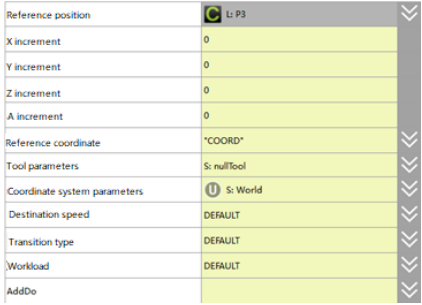
X increment: the position increment in the X direction that the robot is to move when this instruction is executed.
Y increment: the position increment in the Y direction that the robot will move when executing this instruction.
Z increment: the position increment the robot is to move in Z direction when executing this instruction.
A increment: the rotational increment that the robot will move in the A direction when executing this instruction;
Reference coordinate system: coordinate system offset or tool offset selection. Among them, "Coord" means offset relative to the current user coordinate system; "Tool" means offset relative to the tool coordinate system, i.e. reference Tx, Ty, Tz translation or rotation.
Tool parameter: information of the tool to which the reference position belongs.
Coordinate system parameter: information of the coordinate system to which the reference position belongs.
Target speed: the speed at which the instruction runs (variable of type SPEED), where only the per parameter is absolutely valid for this instruction.
Transition type: the transition mode when the robot approaches the end point; RELATIVE: relative transition, the transition parameter is a relative value, indicating the percentage of the distance from the transition point to the end point of the trajectory relative to the length of the whole section of the trajectory; ABSOLUTE: absolute transition, the transition parameter is an absolute value, indicating the distance from the transition point to the end point of the trajectory.
Transition value: the transition value (variable of type ZONE) when the robot approaches the end point, where the per parameter corresponds to a relative transition type valid and the dis parameter corresponds to an absolute transition type valid.
Workload: the workload parameter used by the robot to execute the trajectory.
AddDo: the robot performs an IO operation after executing this instruction.
MovLOffset - Linear offset motion command
MovL Interpolation Relative Offset command. This command specifies a reference position as the starting position for an offset movement relative to the coordinates or tool.
It differs from MovLRel only in that it specifies the starting point of the offset movement, not necessarily the current position or the endpoint of the previous command, and all other functions are the same.
Figure 6-13 Parameter editing interface of MovJOffset
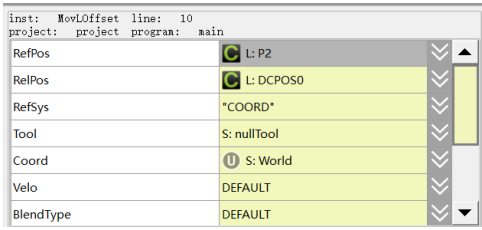
The new command parameters compared to MovLRel are as follows:
Reference position: The starting point of the offset movement (APos or CPos).
Tool parameters: Information on the tool to which the reference position belongs.
Coordinate system parameters: Information on the coordinate system to which the reference position belongs.
MovLOffsetC – Linear offset motion command
The function is the same as that of MovLOffset instruction, but the difference is that the relative position of the target is changed from a variable of DCPOS type to four real type constants, X increment, Y increment, Z increment and A increment.
Figure 6-14 MovLOffsetC Parameter Editing Interface
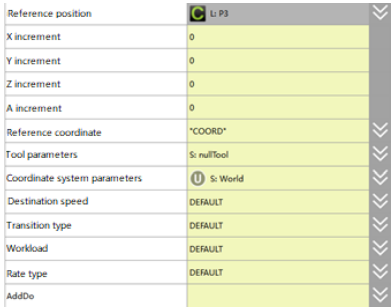
Reference position: the starting point of offset movement (APOS or CPOS).
X increment: the position increment that the robot will move in X direction when executing this instruction.
Y increment: the position increment that the robot has to move in the Y direction when executing this instruction.
Z increment: the position increment the robot is to move in Z direction when executing this instruction.
A increment: the rotational increment that the robot will move in the A direction when executing this instruction.
Reference coordinate system: coordinate system offset or tool offset selection. Among them, "Coord" means offset relative to the current user coordinate system; "Tool" means offset relative to the tool coordinate system, i.e. reference Tx, Ty, Tz translation or rotation.
Tool parameter: information of the tool to which the reference position belongs.
Coordinate system parameter: information of the coordinate system to which the reference position belongs.
Target speed: the speed at which the instruction runs (variable of type SPEED), where only the per parameter is absolutely valid for this instruction.
Transition type: the transition mode when the robot approaches the end point; RELATIVE: relative transition, the transition parameter is a relative value, indicating the percentage of the distance from the transition point to the end point of the trajectory relative to the length of the whole section of the trajectory; ABSOLUTE: absolute transition, the transition parameter is an absolute value, indicating the distance from the transition point to the end point of the trajectory.
TRANSITION VALUE: the transition value (variable of type ZONE) when the robot approaches the end point, where the per parameter corresponds to a relative transition type valid and the dis parameter corresponds to an absolute transition type valid.
Workload: the workload parameter used by the robot to execute the trajectory.
AddDo: the robot performs an IO operation after executing this instruction.
Trigger command does not support single-step mode by default, you can modify the "single-step enable" parameter in the main interface according to the order of [General Settings] -> [Program Settings] to enable/disable the single-step mode of trigger command.
MovJSearch - Searching command (MovJ)
A search command, which performs IO detection or torque detection when executing the MovL command.
When the search condition is IO detection and the value of index IO reaches the triggered value, stop running the command and continue to execute the next command with the interrupt return value set to 1.
When the search condition is torque detection and the value of the index axis torque reaches the triggered value, stop running the command and continue to execute the next command, with the interrupt return value set to X.
If there is no interruption during the command execution, set the interrupt return value to 0.
Figure 6-15 Parameter editing interface of MovJSearch
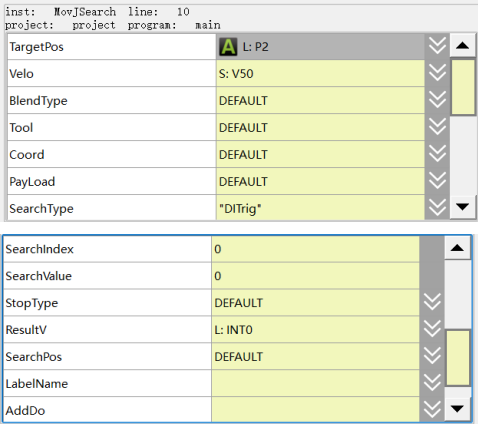
Target position: The final position of the command (the position point of APOS or CPOS).
Target speed: The speed at which the command position is run (SPEED variable). Only the PER parameter is absolutely valid for this command.
Tool parameter: Information on the tool.
Coordinate system parameter: Cartesian coordinate system to which the target position refers.
Workload: Information on the workload.
Transition type: The way of transition when the robot approaches the endpoint.
− DEFAULT: Default, i.e. no transition parameter is set in the command. If the SetBlendParam parameter is used in the program, the transition operates still works the way FINE does.
− FINE: Equivalent in effect to DEFAULT.
Note: MovJSearch does not support transition planning with the next motion command in the current version.
Type of detection:
− DITrig: Physical digital IO input detection.
− AITrig: Physical analogue IO input detection.
− SIMDITrig: Virtual digital IO input detection.
− SIMAITrig: Virtual analogue IO input detection.
− TorqTrig: Torque detection.
Trigger index:
− For DITrig/SIMDITrig/ AITrig/ SIMAITrig, this parameter indicates the IO port number to be detected.
− For TorqTirg, this parameter indicates the axis number to be detected.
Trigger value:
− For DITrig/SIMDITrig/ AITrig/ SIMAITrig, the threshold for IO detection.
− For InputTrig, the threshold for IO detection.
For TorqTirg, the threshold value for torque detection, in thousandths of the nominal torque.
STOP type: The way to stop when a signal is detected.
− DEFAULT: Stops immediately;
− HARDSTOP: Stops immediately;
− SOFTSTOP: Stop at reduced speed.
Decel Factor: The value is valid when "SOFTSTOP" is selected as "Stop Type". It is used to adjust the Decel/Accel factor, the greater the value, the faster the deceleration.
AddDo: Robot will perform IO operation after executing this command.
Returned value: The returned value determines whether there is an interrupt during the run. 0: not detected; 1:
Searching succeeded; 2: Signal is detected at the start of the movement
Position of successful search: Returns the coordinate position of the robot at the moment of the interrupt. (APOS type). This parameter can be defaulted.
Label name to jump to in case of a search failure: The name of the label to which the program pointer will jump in case of a search failure, which is the name of a label already taught in the current program (e.g. "Start:"). This parameter can be defaulted.
Note
Transition planning with the next motion command is not supported in the current version of MovJSearch.
Example 1:

MovLSearch - Search command (MovL)
The Search Ccommand refers to IO detection or torque detection while executing this MovL command, which is similar to MovJSearch.
When the search condition is of IO detection and the value of the indexed IO reaches the trigger value, stop running this command and continue to execute the next command with the interrupt return value set to 1.
When the search condition is of torque detection and the value of the index axis torque reaches the trigger value, stop running the command and continue to execute the next command, with the interrupt return value set to 1.
If there is no interrupt during the command running, set the interrupt return value to 0.
Figure 6-16 Parameter editing interface of MovLSearch
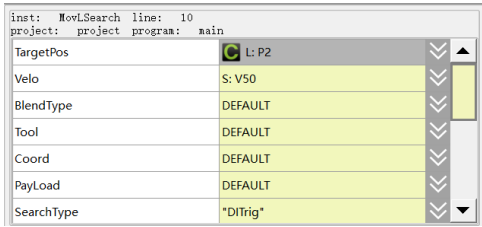
Target position: The final position of the command (the position point of APOS or CPos).
Target speed: The position running speed of command (SPEED variable), where the parameter tcp is valid for the command linear speed and ori is valid for the pose speed (and neither can be 0).
Transition type: The way of transition when the robot approaches the endpoint.
− DEFAULT: Default, i.e. no transition parameter is set in the command. If the SetBlendParam parameter is used in the program, the transition operates still works the way FINE does.
− FINE: Equivalent in effect to DEFAULT.
Note: MovJSearch does not support transition planning with the next motion command in the current version.
Type of detection:
− DITrig: Physical digital IO input detection.
− AITrig: Physical analogue IO input detection.
− SIMDITrig: Virtual digital IO input detection.
− SIMAITrig: Virtual analogue IO input detection.
Tool parameter: Information on the tool.
Coordinate system parameter: Cartesian coordinate system to which the target position refers.
Workload: Information on the workload.
Trigger index:
For DITrig/SIMDITrig/ AITrig/ SIMAITrig, this parameter indicates the IO port number to be detected.
For TorqTirg, this parameter indicates the axis number to be detected.
Trigger value:
For DITrig/SIMDITrig/ AITrig/ SIMAITrig, the threshold for IO detection.
For InputTrig, the threshold value for torque detection, in thousandths of nominal torque.
STOP type: The way to stop when a signal is detected.
− DEFAULT: Stops immediately;
− HARDSTOP: Stops immediately;
− SOFTSTOP: Stop at reduced speed.
Decel Factor: The value is valid when "SOFTSTOP" is selected as "Stop Type". It is used to adjust the Decel/Accel factor, the greater the value, the faster the deceleration.
Returned value: The returned value determines whether there is an interrupt during the run. 0: not detected; 1: Searching succeeded; 2: Signal is detected at the start of the movement
Position of successful search: Returns the coordinate position of the robot at the moment of the interrupt. (CPOS type). This parameter can be defaulted.
Label name to jump to in case of a search failure: The name of the label to which the program pointer will jump in case of a search failure, which is the name of a label already taught in the current program (e.g. "Start:"). This parameter can be defaulted.
AddDo: Robot will perform IO operation after executing this command.
Note
Transition planning with the next motion command is not supported in the current version of MovLSearch.
Example 1:

MovLW - Weave command
Weave command, which performs the arc swinging motion in the forward direction based on the set swing frequency and amplitude.
Figure 6-17 Parameter editing interface of MovLW