
59. Differences between EasyBuilder Pro and EasyBuilder8000
What are the differences between EasyBuilder?
EasyBuilder Pro (EB Pro) is editor software provided for eMT3000 Series HMI whereas EasyBuilder8000 (EB8000) is for MT8000/6000i and X Series HMI. The basic differences and restrictions are listed in the following part
1. The format of project files of EB Pro is different from that of EB8000. Please follow the steps to save the project to the new format.
Step 1. Compress the EB8000 project file and save as a .cmp file.
Step 2. Launch EB Pro, decompress the .cmp file.
Step 3. Select the eMT HMI type, edit the project and save. A message appears to inform that the file will be saved as an .emtp file. Click OK to leave. Please note that the project opened, edited, and saved in EB Pro cannot be opened in EB8000.
2. The following lists the file formats in EB Pro and EB8000.
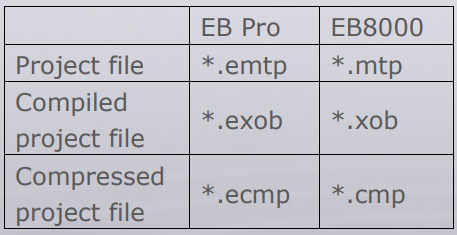
3. Some EB Pro functions cannot be used on MT8000/6000i Series HMI. Since EB Pro and EB8000 are designed for different types of HMI, some EB Pro functions such as Recipe Database, E-mail, Canopen, and Operation Log, cannot be used on MT8000/6000i Series HMI.
4. The project file of EB8000 cannot be directly downloaded to eMT3000 Series HMI.
EB8000 cannot download .mtp project file to eMT3000 HMI, that is, EB Pro cannot download .emtp project file to MT8000/6000i HMI.