96. How to reload the parameter for a driver?
When Weintek updates a driver’s parameters, the parameters in [System Parameter Settings] » [Device List] in an existing project will not change accordingly. Since some columns are unable to be adjusted manually, please refer to the following procedure to reload the new parameter settings.
PS: This document takes Mitsubishi FX3U/FX3G as an example.
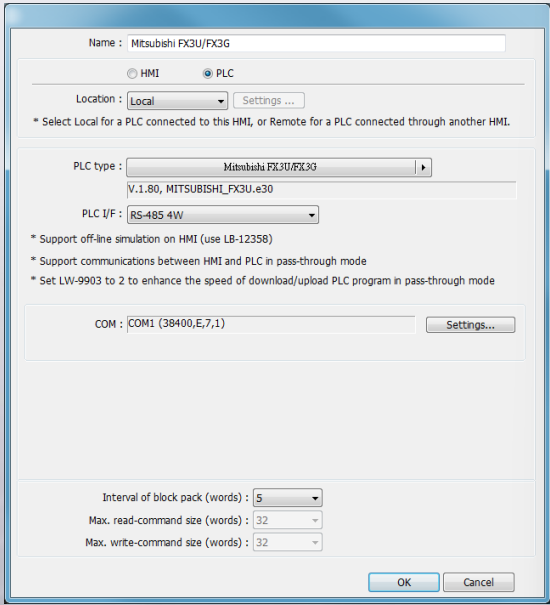
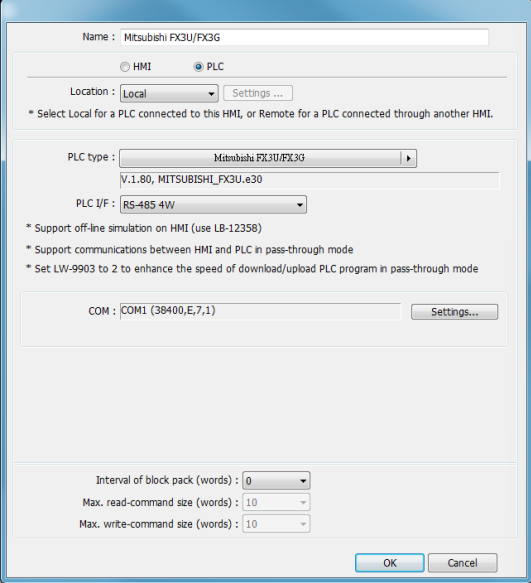
Step 1. As in the following figure, the “Interval of block pack”, “Max. read-command size” and “Max. write-command size” settings of Mitsubishi FX3U/FX3G driver are set to 0, 10, 10, respectively
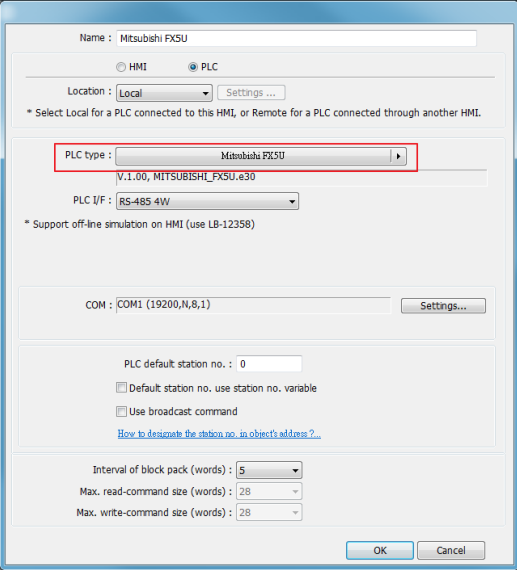
Step 2. Select another driver in [PLC type]. Ex: Mitsubishi FX5U
Step 3. Change the driver back to Mitsubishi FX3U/FX3G. Now “Interval of block back”, “Max. read-command size” and “Max. write-command size” are updated to 5, 32, 32.