
Aktualizacja firmware i OS – cMT-iV5
Streszczenie: Aktualizacja firmware (Runtime) i systemu OS panelu cMT-iV5 przez UtilityManagerEx: [cMT Series] » [Maintenance] » [cMT-iV5 OS Upgrade]. Firmware jest w katalogu instalacyjnym EasyBuilder Pro, plik OS udostępnia Weintek lub dystrybutor.
EN: How to update cMT-iV5 runtime firmware and OS using UtilityManagerEx (cMT-iV5 OS Upgrade).
Dotyczy: Weintek cMT-iV5; EasyBuilder Pro
Źródło: Weintek FAQ (materiały producenta), oryginalny tytuł: „How to update cMT-iV5 Firmware and OS?”
This FAQ explains how to update cMT-iV5 Firmware and OS when some new features or bug fixes are added.
Run “UtilityManagerEx.exe” file in the EB Pro installation folder. Click [cMT Series] » [Maintenance] » [cMT-iV5 OS Upgrade].
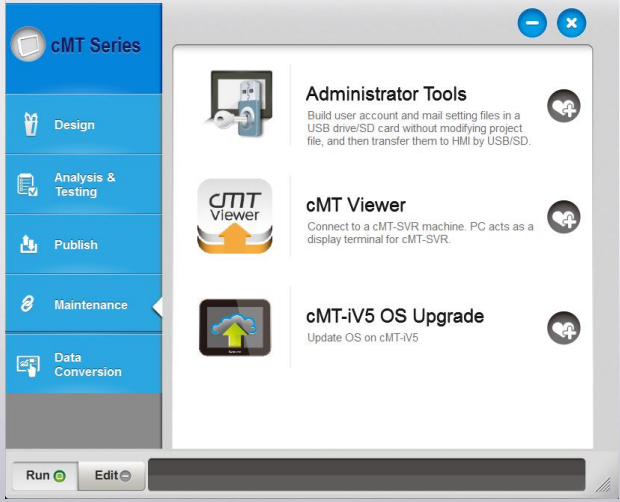
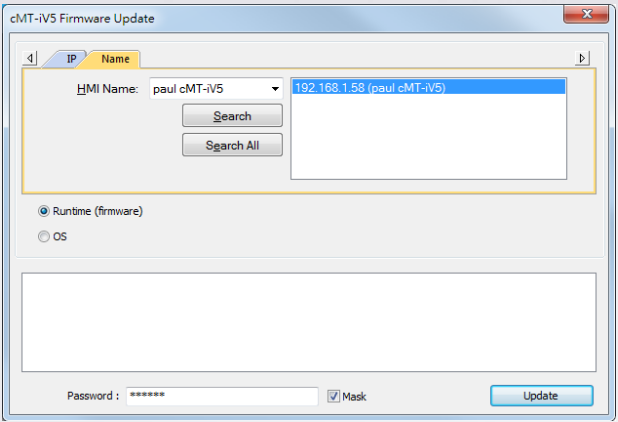
Two options for update can be found:
1. [Runtime (firmware)]: The file can be found in EB Pro installation folder \ firmware folder. The latest firmware can be gained after downloading the latest EasyBuilder Pro. After download, select the HMI directly and click [Update].
2. [OS]: The file is not included in EB Pro installation folder. Please contact Weintek or your local distributor for assistance.
Słowa kluczowe
aktualizacja firmware, aktualizacja OS, cMT-iV5, UtilityManagerEx, Utility Manager, cMT-iV5 OS Upgrade, Runtime, firmware, Maintenance, How to update cMT-iV5 Firmware and OS?