
Dekompresja pliku .ecmp/.cmp do projektu .emtp/.mtp
Streszczenie: Dekompresja spakowanego projektu .ecmp/.cmp do edytowalnego pliku .emtp/.mtp w EasyBuilder Pro ([Tool] » [Compress/Uncompress]).
EN: How to uncompress .ecmp/.cmp archives into editable .emtp/.mtp projects in EasyBuilder Pro.
Dotyczy: EasyBuilder Pro
Źródło: Weintek FAQ (materiały producenta), oryginalny tytuł: „How to uncompress file?”
This FAQ introduces how to uncompress .ecmp / .cmp file to .emtp / .mtp file, and then edit the file in EasyBuilder Pro.
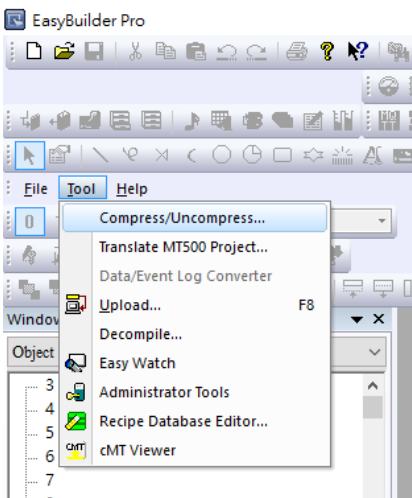
Step 1. Open EasyBuilder Pro, and click [Tool] » [Compress/Uncompress].
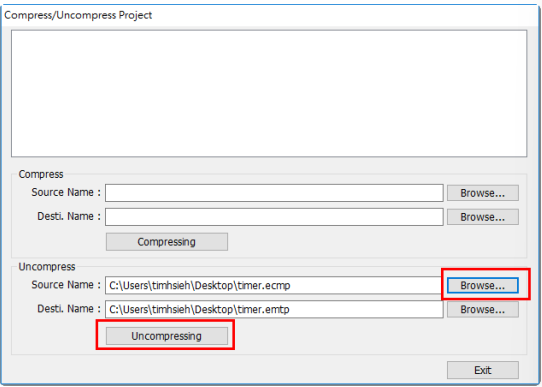
Step 2. When the dialog box pops up, click [Browse] to open the desired file (*.ecmp or *.cmp), and designate the destination directory. Choose [Uncompressing] to process extraction.
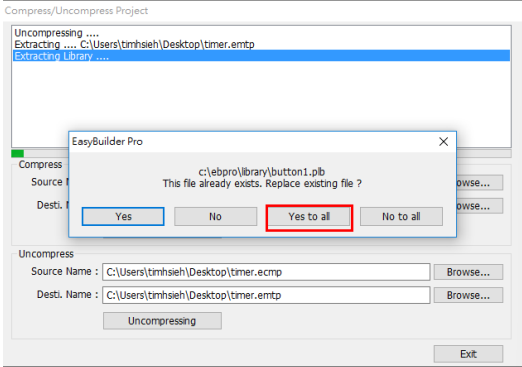
Step 3. Because the files of older version has already existed, just click [Yes to all] to replace it.
Step 4. After uncompressing file is done successfully, the *.emtp file can be found in the designated directory. Now you can open the file in EasyBuilder Pro and edit it.

Słowa kluczowe
dekompresja, uncompress, rozpakowanie projektu, plik .ecmp, plik .cmp, plik .emtp, plik .mtp, Compress/Uncompress, EasyBuilder Pro, How to uncompress file?