
Funkcja bezpieczeństwa – użytkownicy i hasła w projekcie
Streszczenie: Przykład funkcji bezpieczeństwa w projekcie: definiowanie użytkowników, haseł i klas dostępu (A, B, C) w [System parameter settings] » [Security], logowanie przez rejestry LW9219 (ID) i LW9220 (hasło), stan użytkownika w LW9222 oraz ukrywanie chronionych obiektów.
EN: Example of the EasyBuilder security function: users, passwords and classes, login via LW9219/LW9220, user state in LW9222, hiding protected objects.
Dotyczy: EasyBuilder Pro / EasyBuilder8000
Źródło: Weintek FAQ (materiały producenta), oryginalny tytuł: „How to use security function?”
The following is an example to illustrate the steps of security feature:
Step 1
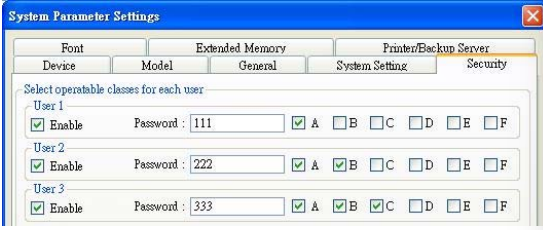
First of all, create a new project. Go to System parameter settings / Security, add three users and set different passwords and classes.
Step 2
Set objects in Window_10 as below:
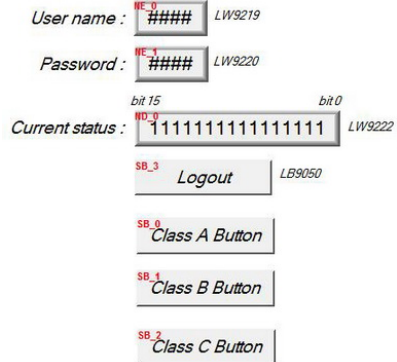
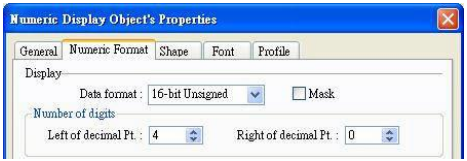
[NE_0] and [NE_1] are Numeric input objects where address are [LW9219] and [LW9220] for inputting user ID and password. [LW9219] is for inputting user ID (1~12), with the length of 1 word, in the form of 16-bit Unsigned as below.
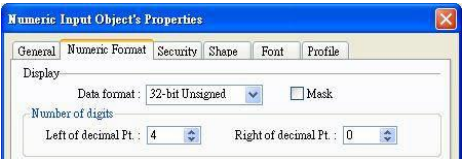
[LW9220] is for inputting user password with the length of 2 words, in the form of 32-bit Unsigned as below.
[ND_0] is Numeric display object with address [LW9222] to indicate user’s
state. The data is in the form of 16-bit Binary.

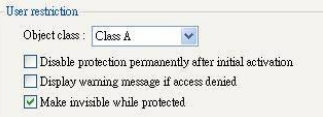
[SB_0] ~ [SB_2] are Set Bit objects which are set with different classes but selected “Make invisible while protected“. i.e. [SB_0] is class A, [SB_1] is class B, [SB_2] is class C. The setting of [SB_0] object:
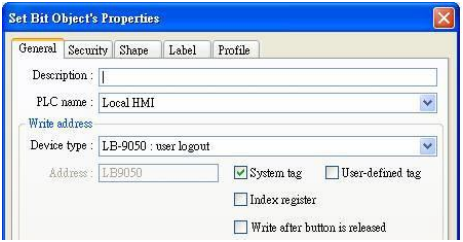
 [SB_3] is Set Bit object with address [LB9050] for user logout:
Step 3
After completing the settings of the objects, execute off-line simulation for the project.
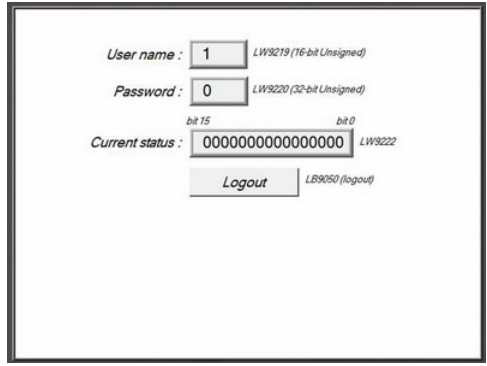
The illustration as below is initial screen of off-line simulation. At this time, no user is entered.
[LW9222] shown “0000000000000000” means current user only can use object with “None” class. Moreover, [SB_0] ~ [SB_2] are the objects with the security levels of class A ~ class C and at the same time “Make invisible while protected“ is selected, therefore, [SB_0] ~ [SB_2] objects are hidden by the system.
Step 4
When the user inputs the password “111”, the screen will become:
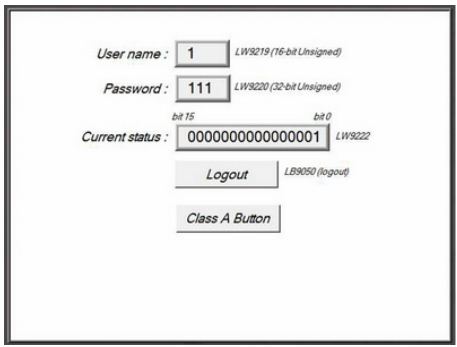
The user 1 is permitted to use object with class A. Consequently, [SB_0] appears and allows user to operate. Now, bit 0 in [LW9222] becomes 1.
Step 5
Next, when the user inputs the user 3’s password (333), the screen will become:
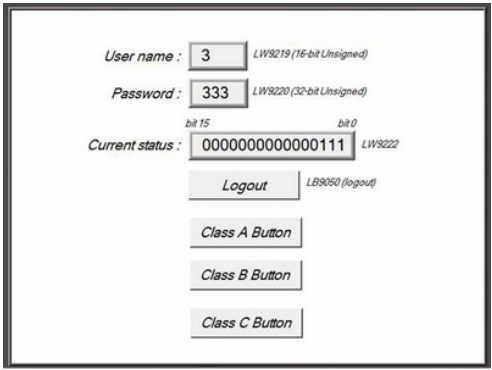
The user 3 is permitted to use object with class A, B, C. Now, bit 0 ~ bit 3 in [LW9222] become 1 to confirm the current user is allowed to use objects with class A, B, C.
Step 6
At this time, if [LB9050] is pressed and force current user to logout, the system will return to initial state. In other words, current user only can use object with “None” class.
Słowa kluczowe
bezpieczeństwo, security, użytkownicy, hasła, klasy dostępu, user class, LW9219, LW9220, LW9222, logowanie, Make invisible while protected, ochrona obiektów, How to use security function?