
Okna popup nie pojawiają się przy VNC Viewer, Media Player i Video In
Streszczenie: Okna popup (np. klawiatura, komunikat o braku miejsca na USB) mogą być zasłonięte przez VNC Viewer, Media Player lub Video In, bo te funkcje systemowe zajmują środek ekranu – należy zmienić domyślną pozycję okien popup.
EN: Popup windows hidden behind VNC Viewer, Media Player or Video In: change the default popup window position.
Dotyczy: panele HMI Weintek; EasyBuilder Pro
Źródło: Weintek FAQ (materiały producenta), oryginalny tytuł: „Popup driver parameters”
Why don’t the popup windows show up when using functions like VNC Viewer, Media Player, or Video In?
When using functions like VNC Viewer, Media Player, or Video In, sometimes the popup window doesn’t show up. Take Video In as example. The popup keyboard of the Numeric object is cut off by the video screen.
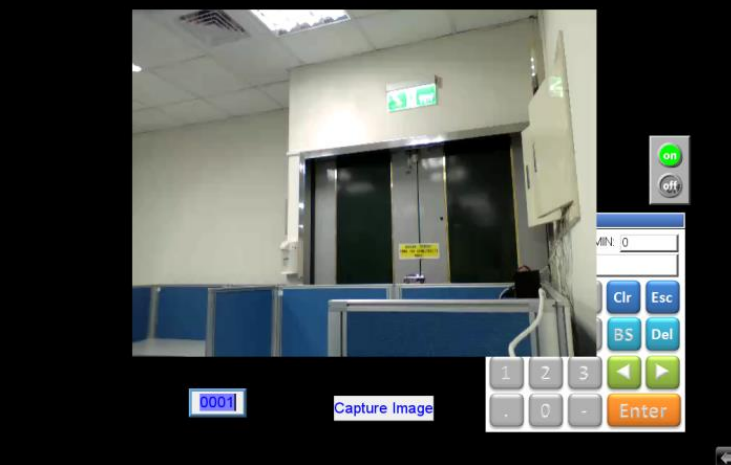
Or while capturing the image, when the memory of the USB disk is full, the “Storage Space Insufficient!!!” window doesn’t show up.
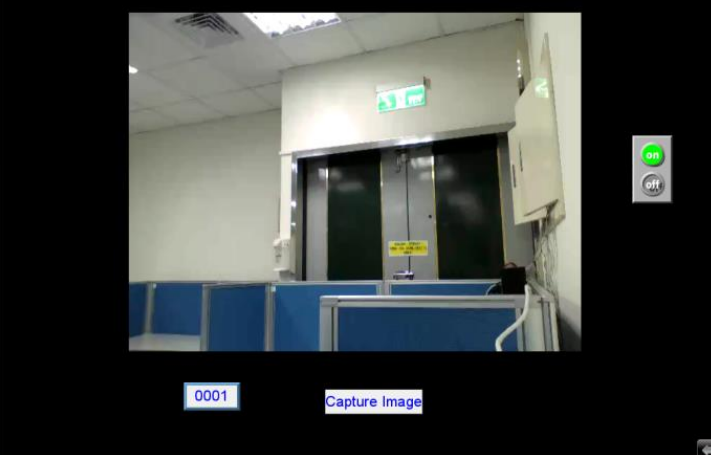
It’s because VNC Viewer, Media Player, or Video In are built in the OS. These functions are usually placed in the center of the screen, and the default positions of popup windows are also the center, so the popup windows will be covered under these functions’ screen. To avoid it, the user needs to change the default position of popup windows.
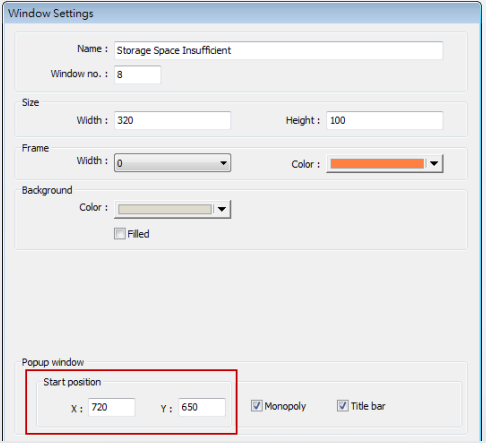
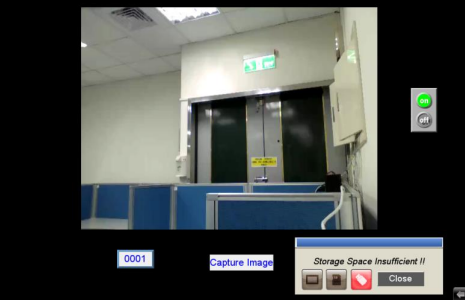
So the popup window will show up at the position where it can be seen.
Słowa kluczowe
okno popup, popup window, klawiatura ekranowa, VNC Viewer, Media Player, Video In, pozycja okna, Storage Space Insufficient, zasłonięte okno, Popup driver parameters