
Podłączenie wielu urządzeń do jednego portu szeregowego
Streszczenie: Obsługa wielu urządzeń na jednym porcie szeregowym: numer stacji w adresie obiektu w składni „SN#adres” (np. 2#1) lub „VARn#adres”, gdzie numer stacji pochodzi z rejestru LW-10000…LW-10015 (VAR0…VAR15).
EN: How to address multiple devices on one serial port using station number syntax SN#address or VARn#address (LW-10000 to LW-10015).
Dotyczy: panele HMI Weintek; EasyBuilder Pro
Źródło: Weintek FAQ (materiały producenta), oryginalny tytuł: „How to Connect Multiple Devices via One Serial Port?”
To connect multiple devices via a single serial port, certain station number can be specified when configuring the serial port in System Parameter Settings » Device List. This FAQ explains the syntax of the variables that can be used when setting the station number for the read/write address of an object.
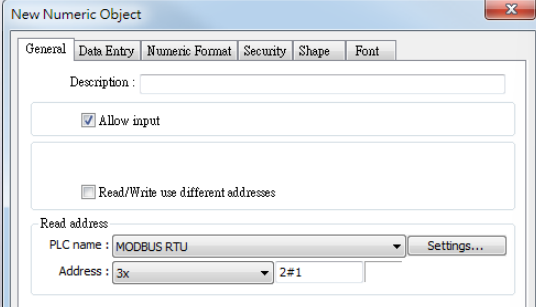
When setting the read/write address of an object, use the syntax “SN#address”. As shown in the following figure, 2#1 indicates station number 2, address 3x1.
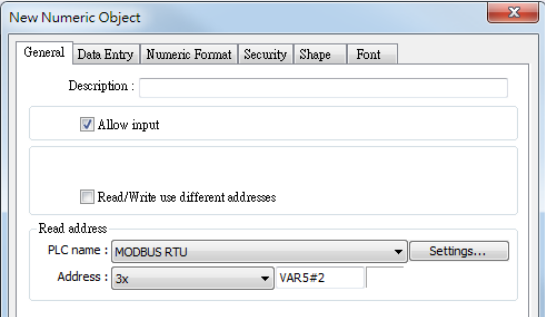
Or, use syntax “VARn#address”. The valid VARn range is from LW-10000 (VAR0) to LW-10015 (VAR15). As shown in the following figure, VAR5#2 indicates that the station number is determined by the value in LW-10005 (VAR5).
Słowa kluczowe
wiele urządzeń, port szeregowy, numer stacji, station number, SN#address, VARn, LW-10000, LW-10015, Device List, RS-485, Modbus RTU, How to Connect Multiple Devices via One Serial Port?