
Włączanie i wyłączanie paska ustawień systemowych (System Setting Bar)
Streszczenie: Włączanie i ukrywanie paska ustawień systemowych (System Setting Bar) na HMI: przez bit systemowy LB9020 (serie T, X, i) lub przełącznik DIP 2 (seria i, wymaga restartu panelu).
EN: How to show or hide the HMI System Setting Bar using system tag LB9020 or DIP switch 2.
Dotyczy: panele HMI Weintek MT6000/MT8000 serii T, X i i; EasyBuilder Pro
Źródło: Weintek FAQ (materiały producenta), oryginalny tytuł: „How to Enable/Disable System Setting Bar?”
EasyBuilder Pro supports the function of using system tag [LB9020] to enable/disable system setting bar, or set the [DIP Switch 2] to ON/OFF for activating this function.
If using [LB9020] to control the system setting bar, when LB9020 set ON, the bar is displayed, and set OFF to hide the system setting bar.
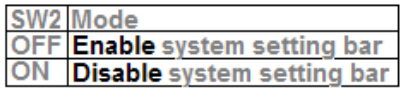
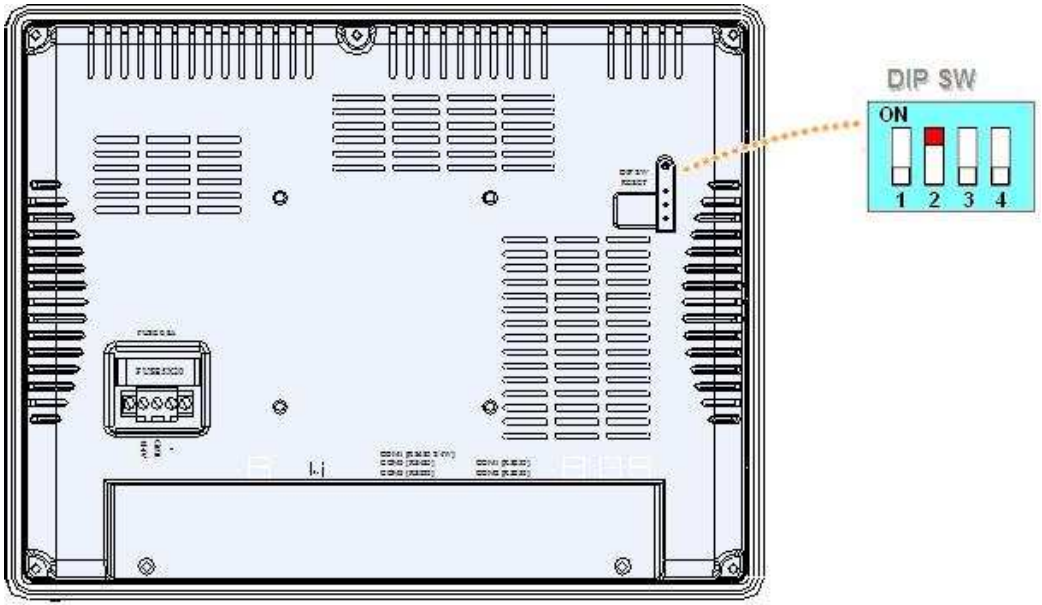
When [DIP Switch 2] set ON, the system setting bar is disabled, and when [DIP Switch 2] set OFF, the system setting bar is able to control. Users have to restart HMI to enable/disable this function.
Note:
[LB9020] is available for MT6000/8000 T, X, i series.
[DIP Switch 2] is available for MT6000/8000 i series.
Słowa kluczowe
pasek ustawień systemowych, System Setting Bar, LB9020, DIP Switch 2, przełącznik DIP, ukrycie paska, system tag, rejestr systemowy, MT6000, MT8000, How to Enable/Disable System Setting Bar?