
Wyświetlanie projektu w orientacji pionowej (portrait)
Streszczenie: Wyświetlanie projektu w orientacji pionowej: na HMI w [System settings] » [OS setting] wybrać 90° lub 270° (serie eMT, iE, XE, mTV, i; w cMT-iV5 [Setting] » [General] » [Direction]), a w EasyBuilder utworzyć projekt od razu w trybie Portrait – trybu nie można zmienić w trakcie edycji.
EN: How to display a portrait-mode project on the HMI: set 90/270 rotation on the HMI and create the project in Portrait mode in EasyBuilder.
Dotyczy: panele HMI Weintek serii eMT, iE, XE, mTV, i oraz cMT-iV5; EasyBuilder Pro
Źródło: Weintek FAQ (materiały producenta), oryginalny tytuł: „Portrait Display on HMI”
If the project file is edited in portrait mode, the following settings help to
display project correctly on HMI.
A.
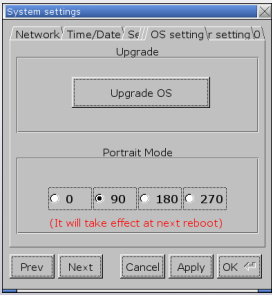
Step 1. On HMI, open [System settings] » [OS setting], and select [90] or [270] in Portrait Mode group box.
Applicable models: eMT, iE, XE, mTV, i Series
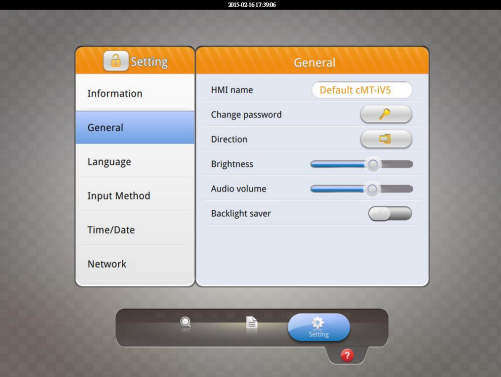
 For cMT-iV5 model, open [Setting] » [General] » [Direction] to set
portrait mode.
Step 2. Launch EasyBuilder, click [File] » [New] and select [Portrait] as display
mode.
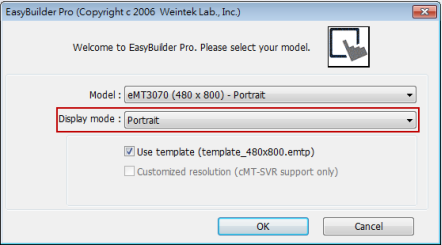
Please note that setting project in Portrait mode before editing the project is necessary. During project editing, the display mode cannot be changed.
Słowa kluczowe
orientacja pionowa, portrait, tryb pionowy, obrót ekranu, 90, 270, OS setting, Direction, cMT-iV5, nowy projekt, EasyBuilder Pro, Portrait Display on HMI