
Specyfikacja, złącza i podłączenie mTV-100
Streszczenie: Dane techniczne i podłączenie Weintek mTV-100 – panelu HMI bez wbudowanego ekranu, z wyjściem HDMI 1280×720, montowanego na szynie DIN. Zawiera: cechy, specyfikację (ARM Cortex A8 600 MHz, 256 MB Flash/RAM, Ethernet 10/100/1G, USB host, SD, COM1 RS-232, COM2 RS-485 2W/4W, COM3 RS-485 2W, zasilanie 24 VDC ±20%, 230 mA), wymiary, rozkład pinów złączy COM, port USB i Ethernet, przełączniki DIP, diody LED, baterię CR1225, podłączenie zasilania oraz sposoby podłączenia monitorów HDMI/DVI.
EN: Weintek mTV-100 (headless HMI with 720p HDMI output) specifications, dimensions, COM pinouts, DIP switch modes, LEDs, battery, power wiring and HDMI/DVI connection options.
Dotyczy: Weintek mTV-100; EasyBuilder Pro V3.00.02 lub nowszy
Źródło: dokumentacja producenta (Weintek), oryginalny tytuł: „Specification”
Features
(cechy)
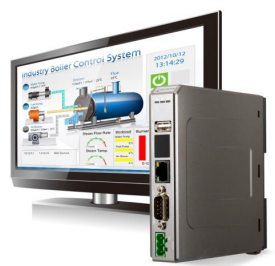
- HD 720p High Resolution HDMI Output
- One Gigabit Ethernet Port
- Compact Design and DIN-rail Mountable
- Built-in 256MB Flash Memory
- SD Card Slot for Extension of Storage
- One USB Host Port
- Fan-less Cooling System
- Supports MPI 187.5K
- Power Isolator Inside
Specification (dane techniczne)
| Memory | Storage (MB) | 256 |
| RAM (MB) | 256 | |
| Processor | ARM Cortex A8 600MHz | |
| I/O Port |
SD Card Slot | SD/SDHC |
| USB Host | USB 2.0 x 1 | |
| USB Client | N/A | |
| Ethernet | 10/100/1G x 1 | |
| Com Port | COM1 RS-232,COM2 RS-485 2W/4W,COM3 RS-485 2W | |
| CAN Bus | N/A | |
| HDMI | Resolution 1280 x 720 | |
| RTC | Built-in (CR1225 3V lithium |
|
| Power |
Input Power | 24±20%VDC |
| Power Consumption | 230 mA@24V | |
| Power Isolation | Built-in | |
| Voltage Resistance | 500VAC (1 min) | |
| Isolation Resistance | Exceed 50M at 500VDC | |
| Vibration Endurance | 10 to 25Hz(X,Y,Z direction 2G 30 minutes) | |
| Specification |
Enclosure | Plastic |
| Dimensions WxHxD | 130 x 115 x 27mm | |
| Weight (kg) | Approx. 0.18 kg | |
| Mount | 35mm Din rail mounting | |
| Storage Temperature | -20° ~ 70°C (-4° ~ 158°F) | |
| Operating Temperature |
-20° ~ 55°C (-4° ~ 131°F) |
|
| Relative Humidity | 10% ~ 90% RH (non-condensing) | |
| Certificate | Complies with CE | |
| Software | EasyBuilder Pro V3.00.02 or later versions |
1.1 Dimensions
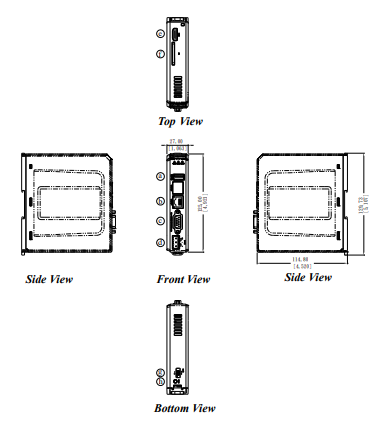
Opis rysunku: wymiary zewnętrzne mTV-100 wg specyfikacji: 130 × 115 × 27 mm (W × H × D), szerokość panelu czołowego 27 mm. Litery a–h na rysunku oznaczają elementy opisane w tabeli poniżej (porty USB, Ethernet, COM, zasilanie, HDMI, gniazdo SD, przełącznik DIP, przycisk Reset). Montaż na szynie DIN 35 mm.
| a | USB Host Port | e | HDMI |
| b | Ethernet Port | f | SD Card Slot |
| c | Com1 RS-232, Com2 RS-485 2W/4W, Com3 RS-485 2W |
g | DIP Switch |
| d | Power Connector | h | Reset Button |
1.2 Connector pin designations
| PIN# |
Symbol |
COM1 RS-232 |
COM2 RS-485 | COM3 RS-485 |
|
| 2W | 4W | ||||
| 1 | Data+ | Data+ | |||
| 2 | RxD | Received Data | |||
| 3 | TxD | Transmitted Data | |||
| 4 | Data- | Data- | |||
| 5 | GND | Signal Ground | |||
| 6 | RX+ | Data+ | RX+ | ||
| 7 | RX- | Data- | RX- | ||
| 8 | TX+ | TX+ | |||
| 9 | TX- | TX- | |||
1.3 USB Host port and SD card slot
USB 2.0 full speed host interface supports USB mouse devices, keyboards, printers, barcode scanners, and USB disk. While using external hard drive, use external power supply. Do not use USB port to charge external device. Insert SD card to be the extension of storage.
1.4 Ethernet port
The unit has one 10/100/1G Ethernet port. The LED indicators on the Ethernet port indicate: Orange LED: LAN link status Green LED: Active status
1.5 DIP switch
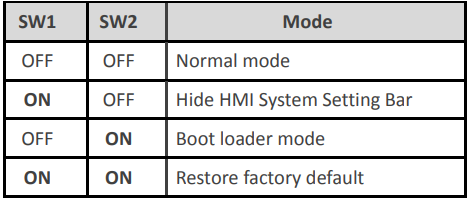
Each HMI is equipped with a reset button and a DIP switch. When using DIP switch to change modes, the corresponding functions will be triggered.
| SW1 | SW2 | Tryb pracy (Mode) |
|---|---|---|
| OFF | OFF | Normal mode – praca normalna |
| ON | OFF | Hide HMI System Setting Bar – ukrycie paska ustawień systemowych |
| OFF | ON | Boot loader mode – tryb boot loadera |
| ON | ON | Restore factory default – przywrócenie ustawień fabrycznych |
Oryginalne ilustracje z instrukcji (2) – tabela przełączników DIP i widok przełącznika
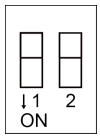
Note: Reboot HMI after adjusting DIP switches to start the corresponding mode.
1.6 LED indicator
LED indicators show the operation status of HMI.
| Power (Orange) | Indicates power status. |
| CPU (Green) | Indicates CPU status. |
| Communication (Blue) | Indicates communication status, blinks during communication. When communication is good, it may stay on |
1.7 CR1225 battery
mTV-100 Series HMI requires a coin type lithium battery CR1225 to keep the RTC running. Battery type: CR1225 3V lithium battery
1.8 Power connection
Power: The unit can be powered by DC power only, voltage range: 24±20% Volts DC, compatible with most controller DC systems. The power conditioning circuitry inside the unit is accomplished by a switching power supply. The peak starting current can be as high as 500mA.
Connection: To make a connection, strip about 3/8”of insulation off the end of the wire, turn the connector screw counterclockwise until the gap is wide open, insert the wire all the way in, and turn the screw clockwise until it is tight.
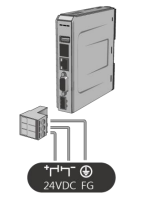
Opis połączeń: zacisk „+” → +24 VDC, zacisk „−” → 0 V (masa DC), zacisk FG → uziemienie (PE). Zasilanie wyłącznie DC 24 V ±20%, prąd rozruchowy do 500 mA.
Note: Connect positive DC line to the ‘+’terminal and the DC ground to the‘-’terminal.
1.9 HDMI Output
Supports 1280 × 720 high resolution HDMI output. Displays image via HDMI or DVI interface LED LCD.
Note: When mTV-100 enters backlight saver mode, an external keyboard or mouse is needed to turn on the backlight. Since TD2220 Touch Display is in standby mode when the backlight is off, touching the screen has no effect. To turn on the backlight again and enable touch screen, connect an external keyboard or mouse to operate.
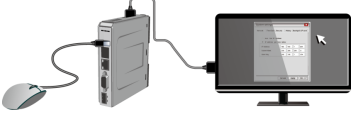
The following part shows different ways to connect HDMI.
Connect to DVI monitor.
Use HDMI-to-DVI converter to connect the monitor.
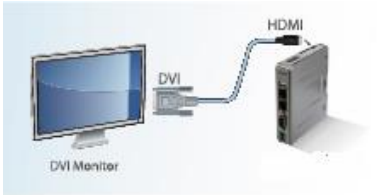
Note: mTV-100 supports resolution 1280x720p, please use DVI monitor / converter.
Directly connect to HDMI monitor.
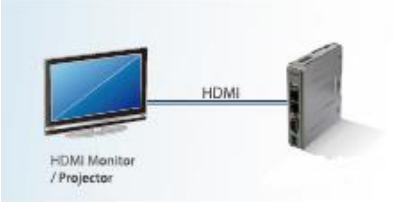
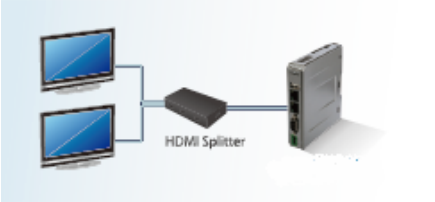
Use HDMI splitter to connect multiple HDMI monitors.
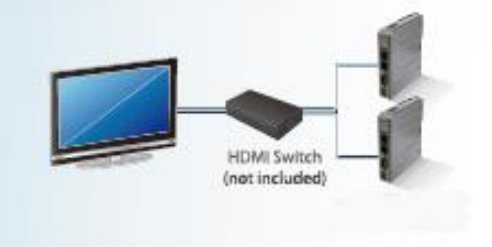
Use HDMI switch to connect two mTV-100 with one HDMI monitor.
Note: If not connecting a repeater, the maximum length of HDMI cable allowed is 15m. To reach a longer distance, please use CAT6 cable or a repeater. HDMI converter is used to detect the monitor and correctly output.
Słowa kluczowe
mTV-100, mTV, Weintek, HMI bez ekranu, headless HMI, HDMI, 720p, 1280x720, DVI, splitter HDMI, HDMI switch, specyfikacja, dane techniczne, wymiary, 130 x 115 x 27 mm, szyna DIN, COM1 RS-232, COM2 RS-485 4W, COM3 RS-485 2W, rozkład pinów, pinout, DB9, przełącznik DIP, SW1, SW2, boot loader, ustawienia fabryczne, factory default, dioda LED, bateria CR1225, RTC, zasilanie 24 VDC, FG, Ethernet 1G, USB host, karta SD, MPI 187.5K, Specification