
2. Installation
2.1 Servomotor
Servomotor can be installed either horizontally or vertically. However, if the servomotor is installed incorrectly, the service life of the servomotor will be shortened or unexpected problems may occur.
Please observe the installation instructions described below to install the servomotor correctly.
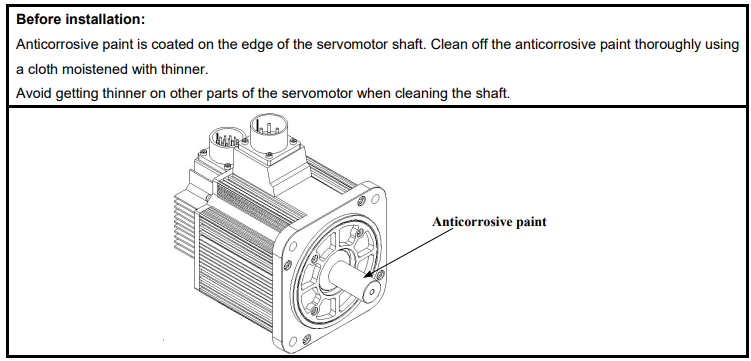
2.1.1 Storage
When the servomotor is not being used, store it in an area with a temperature between -25℃ and 60℃ with the power cable disconnected.
2.1.2 Installation Sites
The servomotor is designed for indoor use. Install the servomotor in an environment which meets the following conditions.
Free from corrosive and explosive gases.
Well-ventilated and free from dust and moisture.
Ambient temperature from 0 to 40℃.
Relative humidity from 26% to 80%( non-condensing).
Facilitates inspection and cleaning.
2.1.3 Installation Alignment
Align the shaft of the servomotor with that of the machinery shaft to be controlled. Then connect the two shafts with an elastic coupling.
Install the servomotor so that alignment accurancy falls within the range shown below.
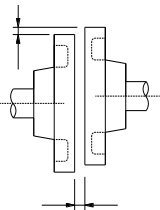
Measure this distance at four different positions in the circumference. The difference between the maximum and minimum measurements must be 0.03mm or less.(Turn together with couplings.)
Note:
·If the alignment accurancy is incorrect , vibration will occur, resulting in damage to the bearings.
·Mechanical shock to the shaft end is forbidden, otherwise it may result in damage to the encoder of the servomotor.
2.1.4 Installation Orientation
Servomotor can be installed ethier horizontally or vertically.
2.1.5 Handling Oil and Water
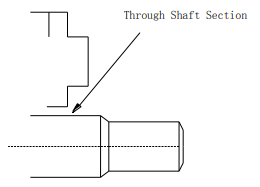
If the servomotor is used in a location that is subject to water or oil drops, make sure of the servomotor protective specification. If the servomotor is required to meet the protective specification to the through shaft section by default, use a servomotor with an oil seal.
Through shaft section:
It refers to the gap where the shaft protrudes from the end of the servomotor.
2.1.6 Cable Tension
When connecting the cables, the bending radius should not be too small, do not bend or apply tension to cables. Since the conductor of a signal cable is very thin (0.2 mm or 0.3 mm), handle it with adequate care.
2.1.7 Install to the Client
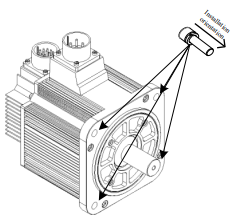
When the servo motor is mounted to the client, please firmly secure the servo motor by the screws with backing ring as shown in the figure.
2.2 Servo Drive
ProNet series servo drive is a base-mounted type. Incorrect installation will cause problems. Always observe the installation instructions described below.
2.2.1 Storage
When the servomotor is not being used, store it in an area with a temperature between -25℃ and 85℃ with the power cable disconnected.
2.2.2 Installation Sites
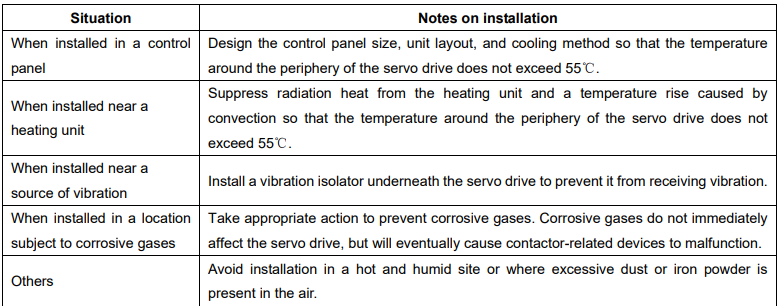
Notes on installation are shown below.
2.2.3 Installation Orientation
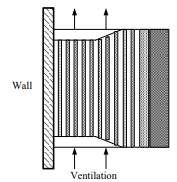
Install the servo drive perpendicular to the wall as shown in the figure. The servo drive must be oriented this way because it is designed to be cooled by natural convection or a cooling fan if required. Firmly secure the servo drive through two mounting holes.
2.2.4 Installation Method
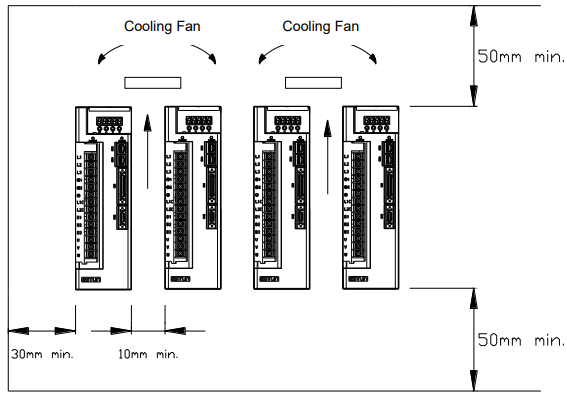
When installing multiple servo drives side by side in a control panel, observe the following installation method.
■Installation Orientation
Install servo drive perpendicular to the wall so that the front panel (containing connectors) faces outward.
■Cooling
Provide sufficient space around each servo drive to allow cooling by natural convection or fans.
■Installing side by side
When installing servo drives side by side, provide at least 10mm space between each individual servo drive and at least 50mm space above and below each one as well as shown in the figure above. Ensure the temperature inside the control panel is evenly distributed, and prevent the temperature around each servo drive from increasing excessively. Install cooling fans above the servo drives if necessary.
■Working conditions
1.Temperature:0~ 55℃
2.Humidity:5%~95%RH
3.Vibration:4.9m/s2 or less
4.Ambient temperature to ensure long-term reliability: 45℃ or less
5.Condensation and Freezing
No comments to display
No comments to display