
Konwersja pliku .dtl do .csv (EasyConverter)
Streszczenie: Konwersja pliku danych .dtl pobranego z HMI do .csv programem EasyConverter (Project Manager) i otwarcie go w Excelu.
EN: How to convert an HMI .dtl data file to .csv using EasyConverter.
Dotyczy: EasyConverter (Project Manager / Utility Manager)
Źródło: Weintek FAQ (materiały producenta), oryginalny tytuł: „How to translate dtl to csv file”
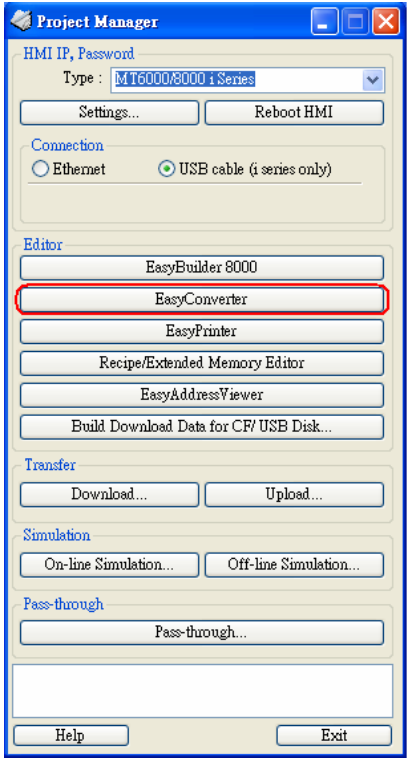
1. After users get the *.dtl file from HMI, open Project Manager and press EasyConverter
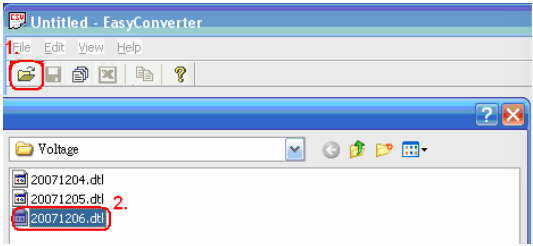
2. Select Open file and choose the desired *.dtl file from your pc.
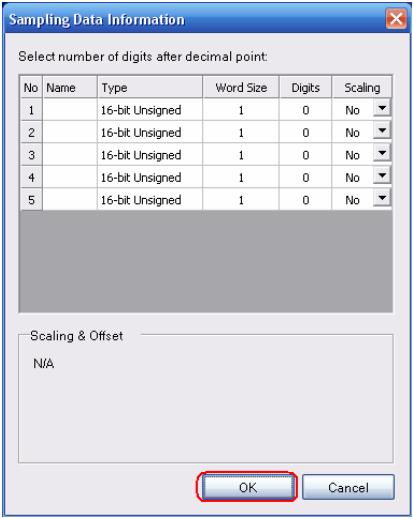
3. Press OK for reading the *.dtl file.
4. Press “EXCEL” icon to translate the file.
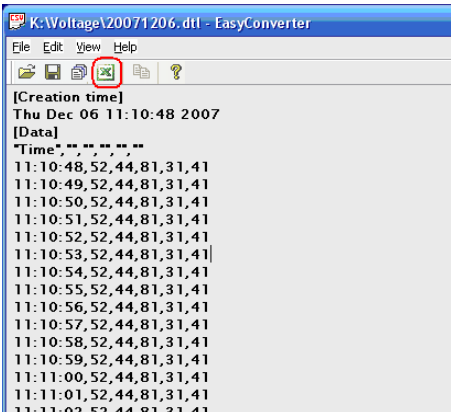
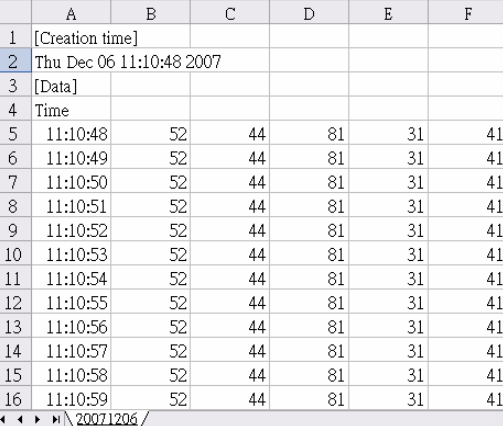
5. The *.dtl file will be translated to *.csv file by Excel.
Słowa kluczowe
plik .dtl, konwersja do CSV, EasyConverter, Excel, dane historyczne, data log, Project Manager, eksport danych, How to translate dtl to csv file