
1. INTRODUCTION
This chapter provides an overview of Copley Motion Objects
1.1: Windows-Based Control of Copley Amplifiers
1.1.1: Simplified Access to CANopen Functions
The Copley Motion Objects simplify creation of Windows-based software for the control of Copley Controls amplifiers over a CANopen network. They give programmers direct access to an amplifier’s CANopen functions without having to learn the complexities of CANopen objects. Copley Motion Objects were built using the Microsoft Component Object Model (COM) architecture, and are fully automation compliant. This means that any Microsoft COM compliant software can access the Copley Motion Objects.
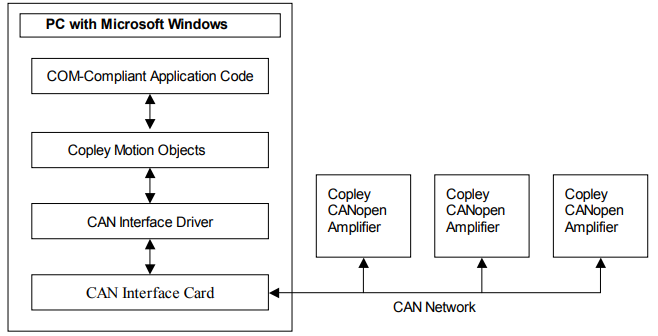
1.1.2: Architectural Overview
The following diagram illustrates the Copley Motion Objects/Microsoft COM model.
1.2: Basic System Requirements
1.2.1: Computer and Operating System
Minimum hardware requirements:
• CPU: Minimum 400 MHz
• RAM: Minimum 128 MB
Operating Systems Supported: NT, 2000, XP.
1.2.2: Software
Copley Controls CME 2 software (latest released version) for tuning and configuration of the amplifier.
The Copley Motion Objects were built using the Microsoft COM architecture and are fully automation compliant. Any COM-compliant software can access them. This includes, but is not limited to, VB 6.0, VB .NET, Visual C++, and LabVIEW.
1.2.3: CAN Interface Card
The PC on which Copley Motion Objects is installed needs a CAN interface card for communication with the CAN network. CMO currently supports Copley, Kvaser, IXXAT, National Instruments, and Vector. The current list of supported CAN interface cards can be obtained from the Copley Controls website (http://www.copleycontrols.com).
NOTE: Only the drivers from Vector are supported for the Vector card.
1.2.4: Amplifier Firmware
Use of Copley Motion Objects requires the latest version of Copley Controls amplifier firmware. The latest version can be downloaded at: http://www.copleycontrols.com/Motion/Downloads/firmware.html
No comments to display
No comments to display