
1. System Introduction
1.1 System overview
The command system file structure is divided into three parts: Project, Program, and Data. Among them, the data is further divided into four domins: System, Global, Project and Program. Program code is saved in files with the following extensions: .er, .erp, and .erd. These files are typically located in the Project folder.
The overall structure of the Project file is as follows:
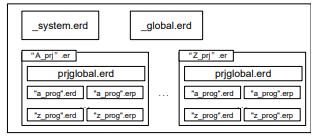
System domin data file: _system.erd
Global domin data file: _global.erd
Project folder: "A_prj".er
Project domin data file: prjglobal.erd
Program command file: "a_prog".erp
Program domin data file: "a_prog".erd
Note: The names of the System and Global scope data files are predetermined and cannot be modified. Other file names can be customized.
Users can edit the command files using a teach pendant or other interfaces.
1.2 System domin data file
The _system.erd file, located in the Project directory, is the system data file. Variables in this file correspond to the System domin and are predefined. Users cannot edit these variables, but they can be referenced by all projects. This file primarily includes four types of predefined variables (the variable types will be explained in detail in the next chapter):
TOOL
USERCOORD
SPEED
ZONE
PAYLOAD
1.2.1 System domin TOOL variable
The TOOL type variables predefined by the system, as shown in the table below:

1.2.2 System domain USERCOORD variables
USERCOORD type variables predefined by the system, as shown in the following table:

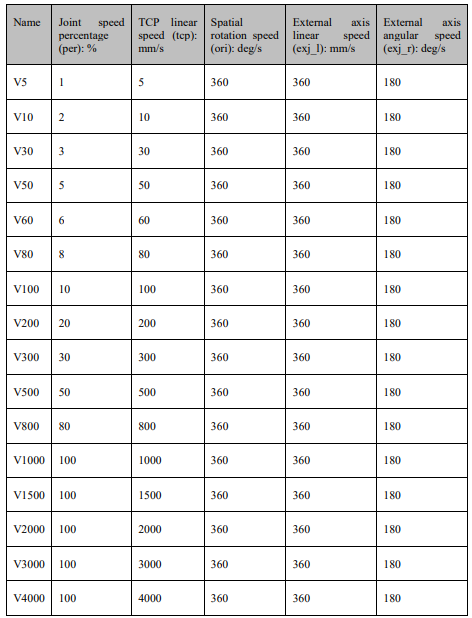
1.2.3 Predefined constants for the System domain SPEED
The system predefined SPEED type variables, as shown in the following table:
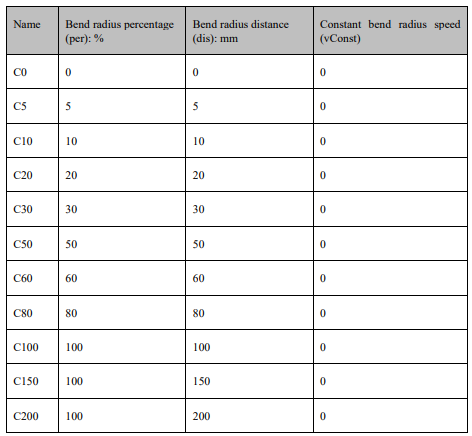
1.2.4 Predefined constants for the System domain ZONE
ZONE type variables are predefined by the system, as shown in the following table:
1.2.5 System domain PAYLOAD variables
PAYLOAD type variables as predefined by the system, as shown in the following table:

1.3 Global domain data file
The _global.erd in the Project directory is a Global data file. The variables correspond to the Global domain and can be edited by the user. The data in the Global domain can be referenced in all projects.
1.4 Project file
1.4.1 Project domin data file
In each project directory (project.er), the prjglobal.erd file is the Project data file. Variables in this file correspond to the Project domin and can be edited by the user. Data within the Project scope can only be referenced by all Program commands within the same project.
1.4.2 Program command files
Each Project directory should contain at least one or multiple Program command files, all with the extension .erp. These files store the commands edited by the user, such as the MovJ command mentioned in subsequent chapters.
1.4.3 Program domin data file
Each program has a corresponding data file with the same name and the .erd extension. The variables stored in this file can only be referenced by the commands within the respective program.
1.5 System keywords
The following "names" are reserved by the system, and mainly include basic functions, commands, variable names, and specific names. Users cannot create variables with the same names.
Basic functions:
and, break, do, else, elseif, end, false, for, function, if, in, local, nil, not, or, repeat, return, then, true, until, while, assert, tostring, tonumber, rawget, xpcall, ipairs, print, pcall, rawset, error, loadfile, rawequal, load, pairs, require, collectgarbage, dofile, next, select, type getmetatable, goto, setmetatable, debug, log, max, acos, huge, pi, cos, deg, tan, random, randomseed, ceil, floor, rad, abs, sqrt, modf, asin, min, fmod, log, atan, exp, sin, coroutine, math, io, os, package, string, table, byte, find, find2, char, gsub, len, sub, lower, trim, upper
Variable types:
BOOL, INT, REAL, STRING, BOOLONEARRAY, INTONEARRAY, REALONEARRAY, APOS, CPOS, TOOL, USERCOOR, AI, AO, DI, DO, SimAI, SimAO, SimDI, SimDO, RET, AREA, POLYHEDRON, CLOCK, PLCREAL, SOCKET, PALLET, WEAVE, SPEED, ZONE, PAYLOAD, EXTTCP, POSITIONER, SYNCOORD, LsScale, LsThresh
Name of commands:
... =... , /*... */, APosToCPos, AreaActivate, AreaDeactivate, PolyhedronAreaActivate, PolyhedronAreaDeactivate, AutoGainDisable, AutoGainEnable, BitAnd, BitLSH, BitNeg, BitOr, BitRSH, BitXOr, CalcCoord, CalcTool, CALL, CLKRead, CLKReset, CLKStart, CLKStop, CompareAI, CompareSimAI, CPosToAPos, CPosToCPos, ELSE, ELSIF, ENDIF, ENDWHILE, GetCamPos, GetCurAPos, GetCurCPos, GetDI8421, GetMatrix, GetSimAIToVar, GetSimDI8421, GetSimDIToVar, GetTrackId, GOTO, Hand, IF, LABEL, MovArch, MovC, MovCW, MovH, MovJ, MovJRel, MovJSearch, MovJSyncQuit, MovL, MovLOffset, MovLRel, MovLSearch, MovLSync, MovLSyncQuit, MovLW, OnDistance, OnParameter, PalletFromGet, PalletFromPut, PalletToGet, PalletToPut, PalletReset, PulseOut, PulseSimOut, RefRobotAxis, RETURN, RUN, SendMessage, SetAO, SetAxisColliParam, SetBlendParam, SetCartDyn, SetColliEnable, SetCoord, SetCurOverRide, SetDIEdge, SetDO, SetDO8421, SetExternalTCP, SetJointDyn, SetMatrix, SetMotionMode, SetPayload, SetPositioner, SetRtInfo, SetRtToErr, SetRtWarning, SetSimAO, SetSimAOByVar, SetSimDIEdge, SetSimDO, SetSimDO8421, SetSimDOByVar, SetSingularPass, SetSyncoord, SetTargetPos, SetTool, SocketClose, SocketCreate, SocketReadInt, SocketReadReal, SocketReadStr, SocketSendInt, SocketSendReal, SocketSendStr, SoftFloatStart, SoftFloatStop, Stop, SyncToUserC, TrigCam, Wait, WaitAI, WaitCondition, WaitDI, WaitDI8421, Waitfinish, WaitFinishCAM, WaitSimAI, WaitSimDI, WaitSimDI8421, WaitWObj, WHILE
Specific names
POSCFG, PLACEOPTION
No comments to display
No comments to display