
SAFETY
This chapter describes the precautions which must be followed to ensure the safe use of the robot. Before using the robot, be sure to read this chapter thoroughly.
ESTUN robots must be transported, mounted and operated in accordance with national laws, regulations and standards. Appropriate safeguards must be correctly performed to protect the users. Before using (mounting, operating, maintaining, repairing) the robot, be sure to read and understand this manual and its relevant manuals.
Be sure to have familiarization with the knowledge of robot system and the safety precaution. Even if all instructions are followed, this is not a guarantee that the robot will not cause injuries or damage.
DEFINITION OF USERS
The personnel can be defined as follows.
Operator
Turns the robot power ON/OFF.
Starts the robot program from the panel.
Programmer
Operates the robot.
Teaches the robot inside the safety area.
Maintenance engineer
Operates the robot.
Teaches the robot inside the safety area.
Maintenance (repair, adjustment, replacement).
Operator must not work in the safety area.
Programmer and maintenance engineer can work in the safety area.
During operation, programming, and maintenance of the robot, the operator, programmer, and maintenance engineer should take precautions to ensure the safety by wearing the following safety items.
Clothes for operation
Safety shoes
A helmet
SPECIAL TRAINING
Tasks in the safety area including transportation, setting, teaching, adjustment, maintenance, etc.
Training course must be performed before operating the robot.
For more information about training course, contact ESTUN.
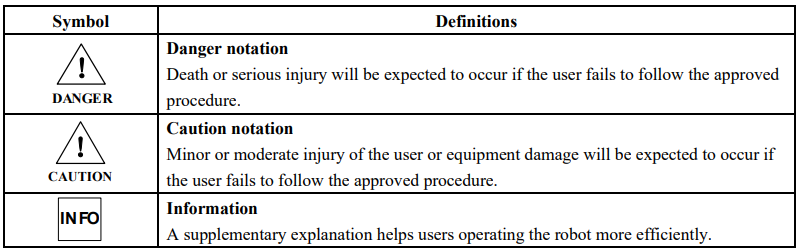
DEFINITION OF SAFETY NOTATIONS
Precautions and information are defined as follows.
SAFETY OF USERS
(1) The robot should be transported and installed as procedures recommended by ESTUN. Wrong procedures may cause severe injuries or damage due to the robot fall.
(2) Draw an area clearly indicates the safety area. Install a fence or hang a warning board to ensure the safety operation of the robot, and keep unauthorized personnel outside the safety area.
(3) Never hang any tools above the robot. Falling of these tools may cause damage to equipment.
(4) Never lean on the cabinet. Never touch any buttons without permission. Unexpected movement of the robot may cause personnel injuries and equipment damage.
(5) Take precautions for falling parts to avoid injuries when disassemble the robot.
(6) Turn off the power when adjusting peripheral equipment.
(7) Peripheral equipment must be grounded.
(8) The robot should be operated in a low speed in the first operation. The speed should be added gradually to check if there is any abnormal situation.
(9) Do not wear gloves when using the teach pendant. Operate with gloves may cause an operation error.
(10) Programs, system variables, and other information can be saved on the memory card or USB memories. Be sure to save the data periodically in case that the data is lost.
(11) Never forcibly move any axis of the robot. Move the axes forcibly may cause injuries or damage.
(12) Take precautions when wiring and piping between the robot, the cabinet, and peripheral equipment. Put the pipes, wires or cables through a pit or covered with a protective lid, to avoid stepped by personnel or run over by a forklift.
(13) Unexpected movement may occur on any operating robot, which will cause severe injuries or damages in the working area. Test (safe door, brake, safe indicators, etc.) must be performed on each safety measures before using the robot. Before turn on the system, make sure that no one is in the working space.
(14) Never set motion range or load condition exceeds the rated range. Incorrect setting may cause personnel injury and equipment damage.
(15) Observe the following precautions when teaching inside the working space of the robot
Do not enable the system unless the mode is switched to manual, and make sure that all auto control is cut off.
Speed must be limited under 250mm/s at manual mode. Only authorized person with fully understand of the risks can adjust the robot to rated speed manually.
Be careful about rotating joints to prevent hair and clothes involved. Take precautions of injury or damage caused by the manipulator or other auxiliary devices.
Check the motor brake to avoid personnel injuries caused by unexpected situation.
Always have an escape plan in mind in case the robot comes towards you unexpectedly
Ensure that there is a place to retreat to in case of emergency
SAFETY OF OPERATORS
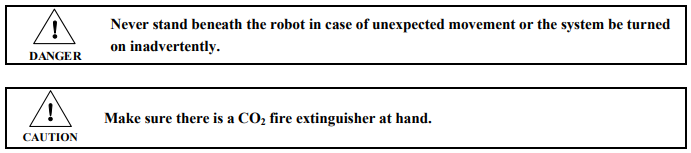
(1) Before operating the robot, check that the SERVO ON indicator goes out when the EMERGENCY STOP button on the right of the front door of the controller and the pendant are pressed. And confirm that the power is turned off.
(2) Never allow unauthorized personnel to touch the controller during operation. This may result in unexpected movement of the robot, severe injuries and material damage.
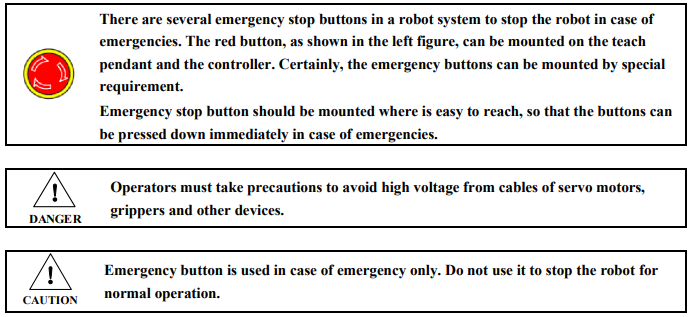
(3) When attaching tools to the robot, be sure to turn off the power of the controller and the peripheral equipment, and display a warning sign. Turning the power on during equipment installation may cause electric shock or injury due to unexpected movement of the robot.
(4) Emergency stop is an external button of the controller that can stop the robot operation. When emergency button is pressed, the power of the robot (except the power of the servo) is cut off. The system will not run unless the pressed emergency button being released and the system being turned on.
SAFETY OF PROGRAMMERS
While teaching the robot, the programmer must enter the robot operation area. The programmer must ensure the safety especially

To use the teach pendant safely, the following precautions should be taken.
Be sure that the enable switch is effective at any time.
Turn off the enable switch when pausing, programming or testing the system.
Teach pendant must be taken with the programmer when teaching in the work space, to avoid inadvertent operation by unauthorized person.
Teach pendant must not be left within the work space of the robot, as injury or damage can occur if the robot comes in contact with the teach pendant.
SAFETY OF MAINTENANCE ENGINEERS
(1) Heated parts
Some parts of the robot are heated when the robot is operating, especially the servo motor and reducer. If a maintenance engineer needs to touch such a part, the user should wear heat-resistant gloves or use other protective tools.

(2) Disassembly parts
Open the cover or shell only after interior parts such as gears are not moving any more. Never open the cover or shell when the gear or bearing is moving. Use auxiliary device to keep interior part to its position.
Observe the following precaution when performing the first test after installation, inspection or maintenance:
a) Clear tools to proper locations outside of the working space of the robot.
b) Make sure that all precaution measures are available.
c) Make sure that there is no one in the working space of the robot.
d) Pay special attention to working condition of the maintenance parts when performing test.
Never use the manipulator as a ladder when performing maintenance. Never climb on the manipulator to avoid falling down.
(3) Pneumatic / hydraulic pressure
There may be air/liquid residue in the system when the air pump or hydraulic pump is turned off. Before checking the pneumatic or hydraulic parts, release remaining pressure from the system to avoid personnel injury or equipment damage.

(4) Although the power supply need to be turned on during fault diagnosis, it must be turned off when perform maintenance.
(5) Brake inspection
Brake may be wearing in daily operation. So brake inspection should be performed by the following procedure:
a) Move each joint to the position where the joint bears maximum load.
b) Turn off the robot. The brake works.
c) Mark each joint.
d) Check if the joint moves over a period of time.
(6) Greasing
Personnel injury or equipment damage may occur during greasing. Observe the following precautions before greasing.
Take additional care of safety by wearing safety items (such as gloves) to avoid injury from heated oil or reducer.
Open the oil chamber with caution and keep away from the opening. Oil may spray due to oil pressure.
Feed the oil according to required quantity and never fill up the oil chamber. Check the oil indicator when finished.
Never mix different types of oil into one reducer. Clean the oil chamber thoroughly before changing oil type.
Oil draining must be performed thoroughly. Check the oil indicator when finished.

SAFETY OF THE TOOLS AND PERIPHERAL EQUIPMENT
Peripheral device may still be running even after the system has been turned off. Personnel injury may occur due to damaged power lines.
SAFETY OF THE ROBOT MECHANICAL UNIT
For abnormal or emergency situations, e.g. persons trapped in or pinched by the robot, the robot axes should be moved. (Contact ESTUN for more details about dismantling).
Small arms can be moved by hand. Lager arms should be moved by crane or other handling equipment.
Fasten the robot firmly before releasing the brake to avoid secondary injury caused by falling arms.
STOP TYPE OF ROBOT
There are three types of robot stop.
Power-off stop
Servo power is turned off and the robots stops immediately. Servo power is turned off when the robot is moving, the path of the deceleration in uncontrolled.
The following processing is performed at Power-off stop:
An alarm is generated and servo power is turned off immediately.
Execution of the program is paused.
Frequent Power-off stop of the robot during operation can cause failures of the robot. Avoid system designs that require routine or frequent Power-off stop conditions.
Alarm stop
The robot system sends alarm (not include power-off alarm), and the robot is decelerated until it stops by control instructions.
The following processing is performed at Alarm stop:
An alarm (not include power-off alarm) is generated due to overload, system faulty, etc.
Control instruction is send from servo system. The robot operation is decelerated until it stops. Execution of the program is paused.
Servo power is off.
Hold
The robot is decelerated until it stops, and servo power remains on.
The following processing is performed at Hold:
The robot operation is decelerated until it stops. Execution of the program is paused.
LABELS
(1) Electric Shock Warning
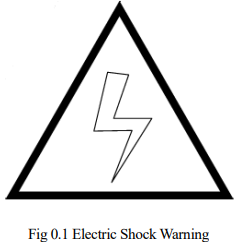
This label indicates hazardous voltage or electric shock.
(2) High-temperature Warning
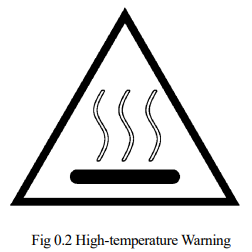
Be cautious about a section where this label is affixed, as the section generates heat. If you have to inevitably touch such a section when it is hot, use a protection provision such as heat-resistant gloves.
(3) No Step-on Warning
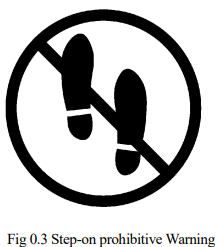
Never step on or climb the robot or controller as it may adversely affect the robot or controller and may get hurt if you lose your footing as well.
(4) Personal Injury Warning
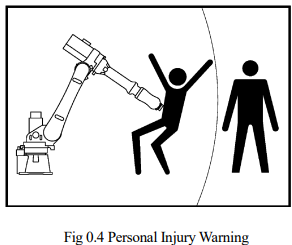
Never enter the operation area while the Manipulator is moving. This is extremely hazardous and may result in serious safety problems.
(5) No Disassembly Warning
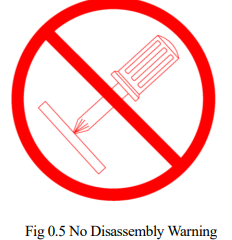
Never perform disassembly without permission where the warning is affixed. Contact ESTUN for disassembly.
(6) Energy Storage Warning
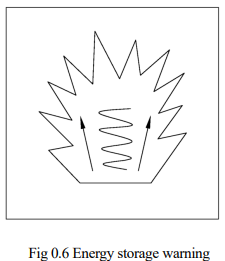
There are springs, gas or liquid with high pressure in the balance cylinder. Disassembly without permission is forbidden.
No comments to display
No comments to display