
4. STO
4.1 Terminals Arrangement (X6)
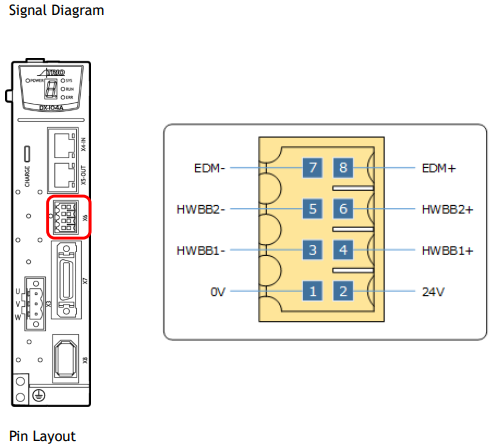

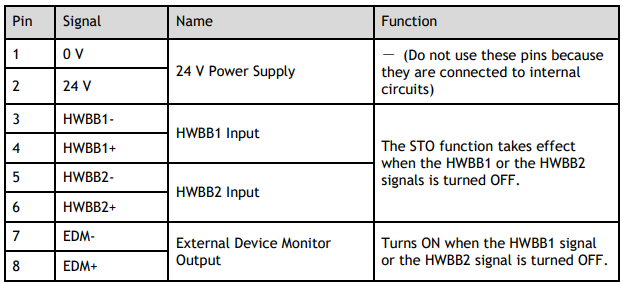
4.2 Safety Function Device Connection
4.2.1 Disconnecting a Safety Function Device
If a safety function device is not connected, keep the Safety Connector plugged into the X6 port, and the shorting pins on the connector remain in the default state.

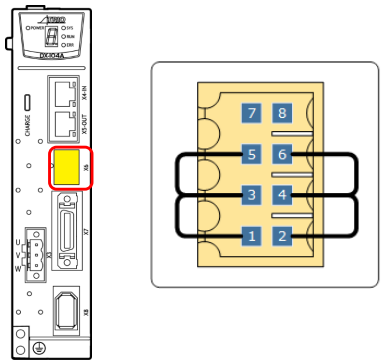

4.2.2 Connecting a Safety Function Device
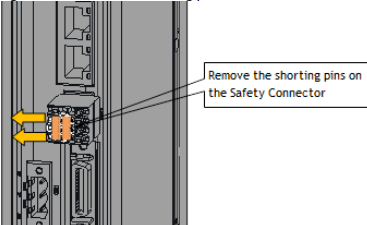
Step 1 Remove the shorting pins on the Safety Connector as shown in Figure 4-1.
Figure 4-1 Remove the shorting pins
Step 2 Wiring the Safety Function Device
Connect the Safety Function Device to the X6 port according to the wiring example shown in Error! Reference source not found..
No comments to display
No comments to display