
Safety Precautions
This Chapter describes the content to be observed for the safe use of the robot. Before using, be sure to read and understand the content in this Chapter.
Companies and individuals using Estun robotics should be familiar with the local and national standards and laws. Appropriate safety facilities shall be provided to protect users. Before use (installation, operation, maintenance and repair), please be sure to read and understand this
Manual as well as other ancillary materials thoroughly, and use it after being familiar with all knowledge on equipment, safety and precautions. However, Estun would not guarantee that the user will absolutely not be injured even if he follows completely all the safety information given in the Manual.
Definition of users
The users of this Manual are defined as follows
Operators:
– To perform the power ON/OFF operation of the robot.
– To start the robot program from the operation panel.
Programmers:
– To operate the robot.
– Teach the robot in a safe area and others.
Maintenance personnel:
– To operate the robot.
– To teach the robot in a safe area and others.
– To carry out the robot maintenance (repair, adjustment, replacement).
– Operators are not allowed to work in the safe areas.
Programmers and maintenance personnel are allowed to work in the safe areas.
When operating, programming and maintaining the robot, the operators, programmers, and
maintenance personnel must take care of their safety using at least the following safety
protectors.
Work clothes suitable for the work
Safety footwear
Helmet
Specialized training
Works carried out in the safe area include transportation, setting, teaching, adjustment, maintenance, etc.
To operate in a safe area, the person must be trained on proper specialized robot operation.
For more information about training, please contact Nanjing Estun Robot Engineering Co., Ltd.
Safety symbols
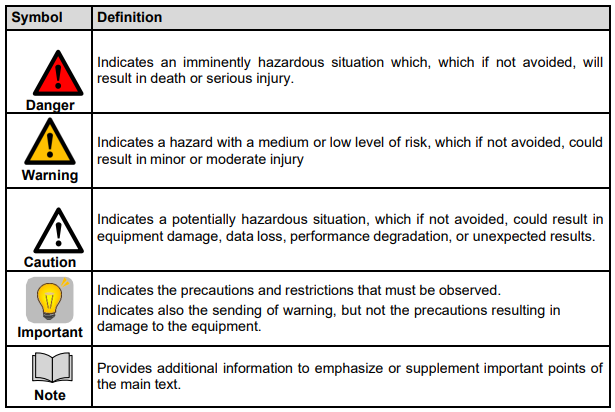
Important safety considerations are indicated throughout the Manual by the following symbols.
Be sure to read and follow the descriptions shown with each symbol.
Safety precautions for users
Be sure to follow the method shown by Estun when transporting and installing the robot, as the incorrect method may cause the robot to tip over and lead to an accident.
Be sure to define a safe area before installing the robot. Fences and warning signs can be provided around the robot's working area to ensure the safe operation of the robot, to prevent the entry of idlers and the robot from hurting people.
There should be no objects hanging above the robot to prevent falling and damaging the robot.
Do not lean against the electric control cabinet or casually push the buttons, in case the robot brings some unexpected movements, which can cause personal injury or equipment damage.
When disassembling the robot, pay attention to the parts of the robot that may fall and hurt people.
When performing individual debugging of peripheral equipment, be sure to power off the robot before operation.
Peripheral equipment should be connected with an appropriate ground wire.
Operate the robot at low speed for the first time of use, then gradually accelerate, and confirm if there’s an abnormality.
When using the teach pendant, make sure to remove the gloves before operating as it may cause errors in operation.
Information such as programs and system variables can be saved to storage cards and other media. To prevent accidental data loss, users are recommended to save data regularly.
Do not move each axis of the robot, otherwise it may cause personal injury and equipment damage.
Protective measures shall be taken when wiring and piping between the electric control cabinet and robots and peripheral equipment, for example, thread the pipes, wires or cables through the pit or cover with protective covers to avoid being stepped on or being crushed by forklift
Any working robot may have unpredictable actions, which may cause serious injury to personnel or damage to equipment. To start a work, it is necessary to test the reliability of each safety measure (fence gate, brake, safety indicator light). Before turning on the robot, make sure that there are no other people standing in the working space of the robot.
The range of operation and load conditions set by the software must not exceed the values provided in the specification table. Improper settings may cause personal injury or machine damage.
Follow the rules given below if the work must be performed within the robot's working space:
– Connect and enable only after the manual mode is selected, and disconnect other automatic control such as computer control.
– When the robot is in manual mode, the speed must be limited to less than 250mm/s; when the robot needs to be adjusted to operate at full speed in manual mode, operation shall only be carried out by professionals who are fully aware of the risks.
– Beware the rotational joints of robot to prevent hair and clothing from being caught in the joints; also note the other dangers that may be caused by the motion of the robot or other accessory equipment.
– Test whether the motor brake is working properly to prevent personal injury caused by robot abnormalities.
– Consider the contingency plan when the robot suddenly moves toward the position on which the operators stand.
– Make sure to set up shelters, just in case.
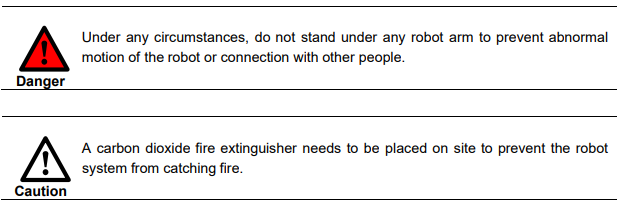
Operators:
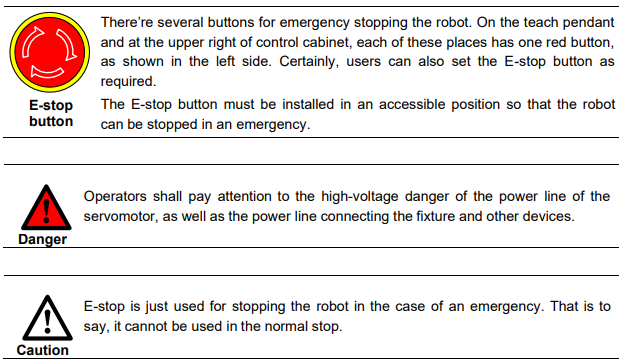
Before operate the robot, you should press emergency stop button, which is on the teach pendant or the upper right of electric cabinet, in order to check whether the indicator of Servo
Ready is not light, and make sure the power of the indicator is turnoff.
In course of operation, never allow the non-work personnel to touch the control cabinet.
Otherwise, the robot might bring some unexpected movements, which can cause personal injury or equipment damage.
When you install a device on the robot, the power supplies of the control cabinet and the device must be cut off (OFF), and then hang a caution sign. If you power on in your installation, it might cause the danger of electric shock, or the robot might bring some unexpected movements, which can cause personal injury.
E-stop
The E-stop is independent of the electrical control of all robots, and it can stop all robot motions.
E-stop means that all power supplies to the robot are disconnected, but the power to the brake on the servomotor is not disconnected. The robot can work again after releasing Estop button and re starting the robot.
Programmers
While teaching the robot, and in some cases, the programmer needs to enter the range of the robot's movement, so be sure to keep himself safe.

To ensure the safe use of the teach pendant, the following rules must be observed:
Ensure that the enable button works at all times.
Disconnect the enabling timely when temporarily stopping the robot, programming or testing.
When entering the robot working space, the demonstrator shall bring the teach pendant to avoid other people operating the robot without the programmer is informed.
The teach pendant must not be placed within the working space of the robot to prevent abnormal actions in case of collision between the robot and the teach pendant.
Maintenance personnel
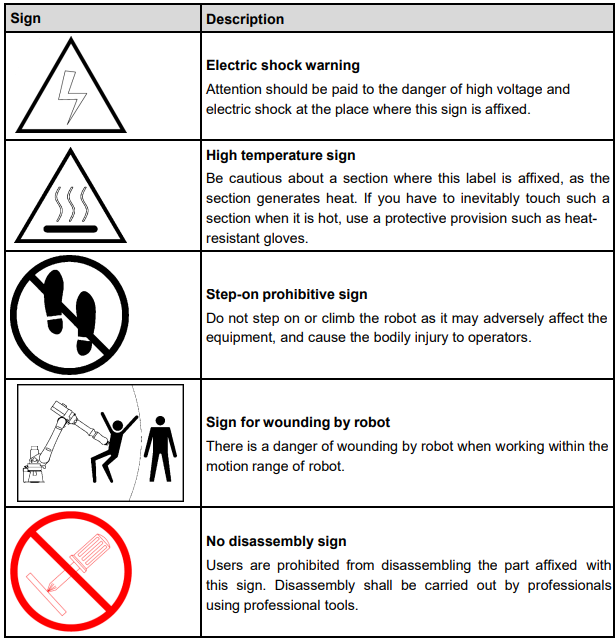
Pay attention to the parts in the robot that are prone to become hot
Some parts of the robot in normal operation will become hot, especially the servomotor and reducer, which may cause burns when being touched. When it is inevitable, protective equipment such as heat-resistant gloves should be worn.

Safety precautions on removing parts
Ensure that the internal parts such as the gears are no longer rotating, and then you can open the lid or the protection device. You shall not open the protection device when the gears and bearings are rotating. If necessary, use the auxiliary device to make the internal unfixed parts remains its original position.
The initial test upon repair, installation and maintenance shall be carried out by following the steps below:
– Clean up the robot and all maintenance and installation tools in the working space of the robot.
– Install all the protective measures.
– Ensure that people are standing outside the safe range of the robot.
– Pay special attention to the working conditions of the parts repaired during testing.
In case of robot repair, do not use the robot as a ladder, and do not climb on the robot to avoid falling.
Safety precautions on pneumatic/hydraulic components
After turning off the air source or hydraulic pump, a few residual gas or liquid exists in the pneumatic system or hydraulic system. Beware these gases or liquid, which have a certain energy; we must take some measures to prevent the residual energy from damaging to the human body and equipment. Therefore, it is necessary to release the residual energy in the system before maintaining the pneumatic or hydraulic components.

Safety precautions on pneumatic/hydraulic components
Brake detection
In general, the brake can be worn in the normal operation. Therefore, the brake detection is necessary by following the steps below.
a. Move each joint to a position, where the joint can bear the maximum load.
b. Shut down the robot and brake.
c. Mark every joints of the robot.
d. Examine whether any joint moves after waiting for a moment.
Safety precautions for adding lubricating oil
– When add lubricating oil to the reducer, it might do harm to the person and the equipment.
Therefore, you must obey the below safety information before adding lubricating oil.
– Wear the protective measures (e.g. gloves, etc.) when refueling or draining oil to prevent damage to maintenance personnel caused by high-temperature oil or reducer.
– Be cautious when opening the oil chamber cover. Keep away from the opening as there may be pressure in the oil chamber to cause splashing.
– Oil filling shall be made according to the fuel gauge, which shall be not too full. Check the oil indicator port after oil filling.
– Oil of different designations cannot be added to the same reducer, and the remaining oil must be cleaned up before using the oil of different designation.
– Drain the oil completely or check the oil indicator port after oil filling.

Safety precautions for tools and peripheral equipment
The external equipment of the robot may still be running after the robot is turned off, so damage to the power cord or power cable of the external equipment may also cause bodily injury.
Safety precautions for robot
In an emergency, any arm of the robot that clips the operator shall be removed. Please ask our technicians for details to ensure the safe removal.
Small robot arms can be removed manually, but for large robots, cranes or other small equipment may be required.
Before releasing the joint brake, the mechanical arm needs to be fixed first to ensure that the mechanical arm will not cause damage again to the person trapped under the action of gravity.
Ways to stop robot
The following three ways can be used to stop robot.
Power-Off Stop
Servo power is turned off and the robot stops immediately. Servo power is turned off when the
robot is moving, and the motion path of the deceleration is uncontrolled.
The following processing is performed at Power-Off stop:
An alarm is generated and servo power is turned off, and the robot operation is stopped immediately.
Execution of the program is paused.
For the robot in motion, frequent power-off operations through E-stop buttons will cause robot failure. The system configuration for daily power-off stop should be avoided.
Alarm Stop The motion of the robot is decelerated and stopped through a control command after the robot system issues an alarm (except for the power failure alarm).
The following processing is performed at Controlled stop.
The robot system issues an alarm due to overload, failure, etc. (except for power failure alarms).
The servo system sends a command “Control Stop” along with a decelerated stop. Execution of the program is paused.
The servo power is turned off.
Hold The robot is decelerated until it stops, and servo power remains on
The following processing is performed at Hold.
The robot operation is decelerated until it stops. Execution of the program is paused.
Warning and caution signs
No comments to display
No comments to display