
11. FAQ
You can refer to the topics below if you encounter the problems described in the following frequently asked questions.
11.1 No device is enumerated after running the Software.
Possible Causes
1. The device does not start properly or the network cable is not connected properly.
2. The auto-enumeration is disabled.
3. The Private Discovery Protocol of the device is enabled.
Solution
1. Check the power supply of the device and the network connection.
2. Go to Settings → General, and enable the Device List Auto-enumeration.
3. Go to Settings → General, and set the Device Enumeration Protocols as Standard Protocol And Private Protocol.
11.2 The Software enumerates a device, but fails to connect it.
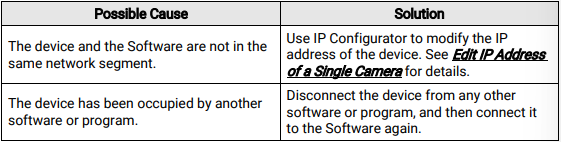
11.3 Why does the live view show black image?
Question
Why does the live view show black image?
Answer
It might be because the iris value is too large or the exposure value is too small. Hence, you can decrease the iris value, increase the exposure value, or enable auto-exposure.
11.4 Why do I fail to set the Exposure Time and Gain in the Image Settings section?
Question
Why do I fail to set the Exposure Time and Gain in the Image Settings section?
Answer
It might because the Exposure Time or Gain is under auto mode. You can load default settings in the Config Management section or go to the feature tree and turn off Exposure Auto or Gain Auto.
11.5 Why can only the SmartSDK be selected as the communication protocol in Communication Settings section?
Question
Why can only the SmartSDK be selected as the communication protocol in Communication Settings section?
Answer
It might because the device is under Test mode. You can go to the live view window and set the device running mode to Normal mode.
No comments to display
No comments to display