
7. MC400 SIMULATOR
Introduction to MC400 Simulator
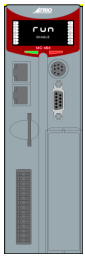
The MC400 is a Microsoft Windows™ based application for the PC, designed to be used in conjunction with Trio Motion Technology’s Motion Perfect development software. It provides a software simulation of one of Trio Motion Technology’s series 4 range of multi-tasking motion controllers.
Running the Simulator
USING STORED CONNECTION PARAMETERS
To run the simulator, select “Triomotion/MC400 Simulator” from the “All programs” menu. This will cause both the simulator GUI and the simulator process to start up. The connection parameters used will be those last set in the application’s “Options” dialog, of default parameters if none have been set.
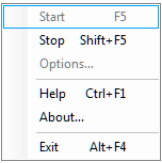
The simulator consists of a GUI which is always running and a simulator process which mimics the internal processing of a real controller. The simulator process can be started and stopped by the user using the context menu.
Whilst the simulator process is running it is possible to connect to the simulator using an application such as Motion Perfect using a local Ethernet port (see Communications).
SPECIFYING CONNECTION PARAMETERS
If the application is run from the command line, the connection parameters may be specified as follows:
ExeFile MPE _ Port REMOTE _ Port HMI _ Port Flash _ File SD _ Card _ Dir
WHERE:
ExeFile is the full or relative path to the MC400Simulator executable file.
MPE_Port is the IP port used for communications with Motion Perfect (default 23).
REMOTE_Port is the IP port used for communications with the Trio PC Motion ActiveX control (default 3240).
HMI_Port is the IP port used for communications with an HMI device (default 10000).
Flash_File is the file which holds the image of the virtual flash memory
SD_Card_Dir is the directory used for SD Memory Card images.
Starting the simulator using command line parameters allows more than one instance to run at the same time as long as the instances have different parameters from any other running instance.
IF AN INSTANCE USE ONE OR MORE PARAMETERS THE SAME AS THOSE USED BY A DIFFERENT INSTANCE THERE MAY BE CONNECTION PROBLEMS AND/OR CORRUPTION OF THE FLASH AND SD-CARD STORED DATA.
Communications
Communication between an application (such as Trio Motion Technology’s Motion Perfect) and to simulator is done using a local Ethernet connection. The simulation acts a local server with the following parameters:
IP Address 127.0.0.1 (localhost)
Command Port 23
Token Port 3240
The command port is used for programs such as Motion Perfect.
The Token port is used with the Trio PC Motion ActiveX control.
START
Starts the simulation process (only available when the simulation process is not running). This is equivalent to powering on the controller.
Only available when the simulator is stopped.
STOP
Stops the simulation process (only available when the simulation process is running). This is equivalent to powering off the controller.
Only available when the simulator is running.
HELP
Displays the help file.
OPTIONS
Displays the options for the simulator.
Only available when the simulator is stopped.
ABOUT
Displays information about this version of the simulator.
EXIT
Terminates the simulator program (both the simulator process and the GUI).
Options
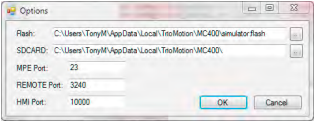
The options dialog allows the user to set up the IP ports used for communications and the files used for saving images of the virtual flash memory and SD Memory Card.
FLASH
The file which holds the image of the virtual flash memory.
SDCARD
The directory used for SD Memory Card images.
MPE PORT
The IP port used for communications with Motion Perfect (default 23).
REMOTE PORT
The IP port used for communications with the Trio PC Motion ActiveX control (default 3240).
HMI PORT
The IP port used for communications with an HMI device (default 10000).
No comments to display
No comments to display