
1. Transportation & Installation
1.1. Transportation

Before moving the robot, position each joint of the robot into the handling position to ensure that the robot remains in the handling position without any movement or displacement during transportation.
The robot should maintain the handling position until it is fully installed and secured. The angular rotation of each axis in the handling position is as follows, and it is crucial to handle the robot according to the specified angles in the table. Failure to do so may result in safety accidents or equipment malfunctions.

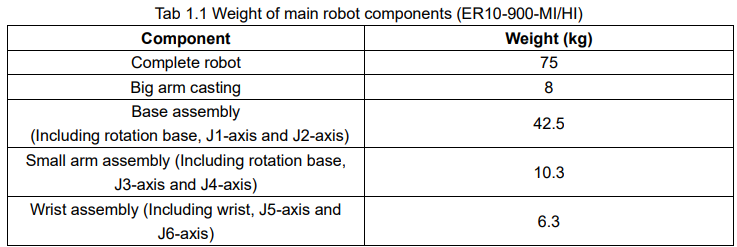
During the installation, disassembly, and transportation of the robot, the weight of the robot is a critical parameter. The table below lists the theoretical weight of the main components of the robot.

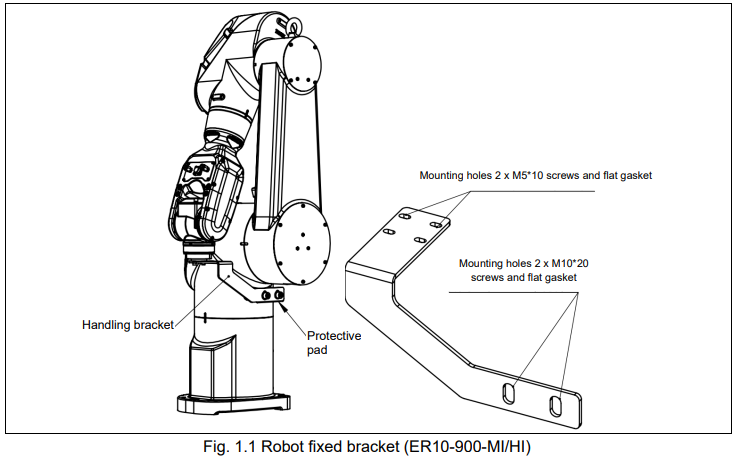
During transportation, it is necessary to install the mounting bracket and protective pad for the robot. Before installing the robot, the mounting bracket and protective pad should be removed. The figure below provides the sizes of the mounting bracket screw holes and the positions of the protective pad, to facilitate the disassembly process for users.
1.1.1. Way of transport
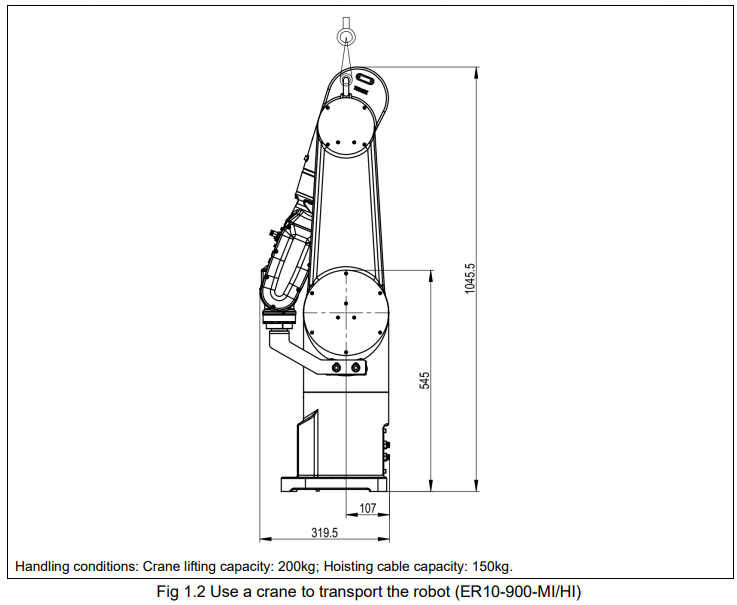
The robot described in this manual can be transported by a forklift. Set the robot to the handling position and install special handling brackets (2 in total) on both sides of the base. Use steel cables (4 in total) for lifting. Prior to handling the robot, it is essential to ensure that all ground anchor bolts of the robot have been completely removed.

1.2. Installation

The following precautions must be fully understood and observed before installing the robot:
Be sure to read and understand SAFETY chapter thoroughly;
ESTUN robots must be transported, mounted and operated by authorized person, and in accordance with the applicable national laws, regulations and standards;
Check the external damage of the robot package. Open the package and check the external damage of the robot;
Make sure the weight of the robot is within the forklift or crane load capacity. Details see Section 1.1 TRANSPORTATION;
Storage and mounting condition should be complied with Section 1.3 INSTALLATION CONDITION.
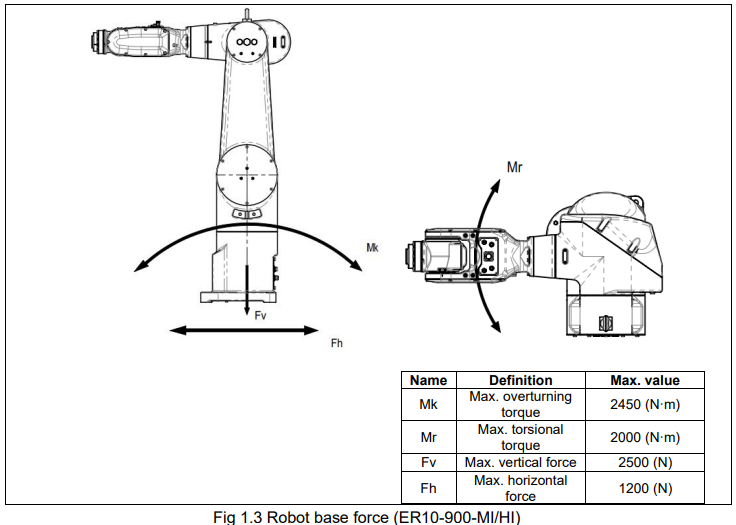
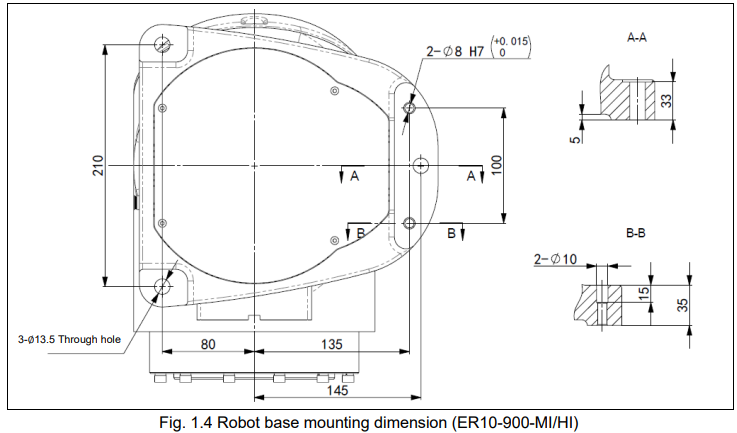


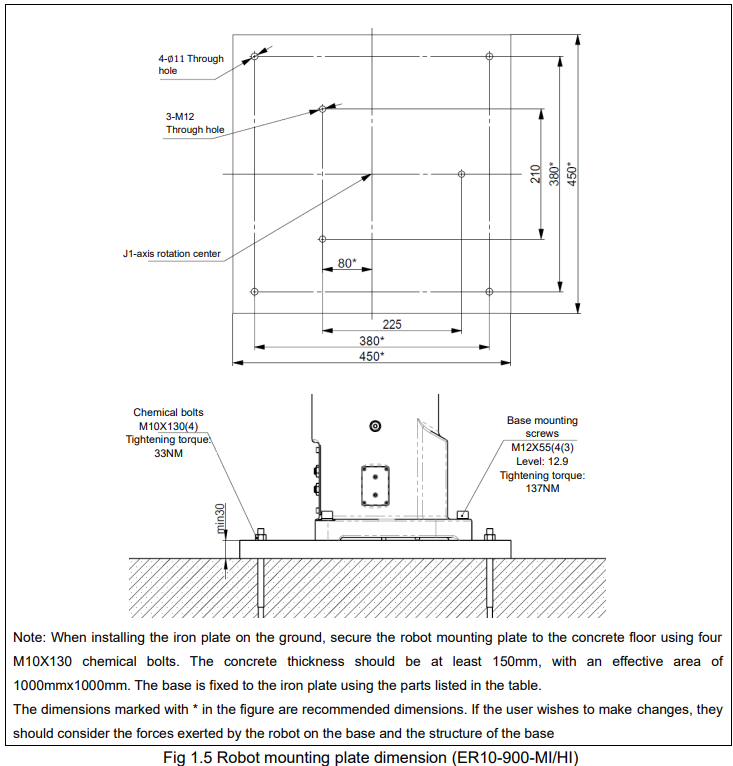
1.2.1.Stand
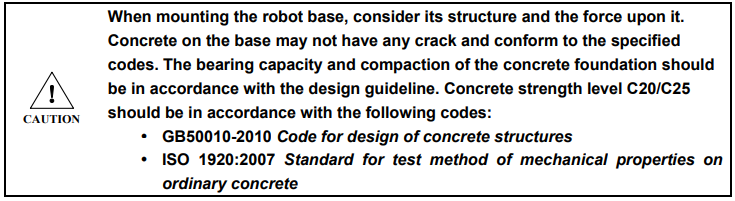
A pedestal for anchoring the robot is not provided. The customer is advised to construct a stand for securely mounting the robot. The shape and size of the stand may vary depending on the application of the robot system. The stand should be capable of supporting not only the weight of the robot but also the dynamic forces exerted during actions with maximum acceleration. To ensure sufficient strength, reinforcement materials such as connecting beams should be used. To minimize vibrations, it is recommended to use steel plates with a thickness of 25mm or more as the mounting surface for the robot. The surface roughness of the steel plate should be below 25um under maximum height conditions. The stand should be securely fixed to an external surface (such as the ground or a wall) to prevent any movement.
1.3. Installation conditions

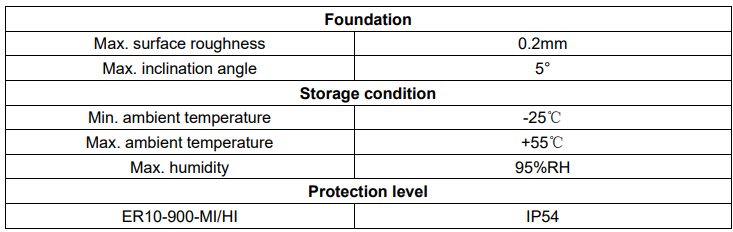
The robot body exhibits excellent resistance to chemicals and solvents, as described below:
(1) The following liquids may cause aging or corrosion of rubber components (seals, gaskets, O-rings, etc.) on the robot. Please refrain from using them, except for products approved by ESTUN.
(a) Organic solvents
(b) Cutting fluid including chlorine/gasoline
(c) Amine type detergent
(d) Acid, alkali and liquid causing rust
(e) Other liquids or aqueous solutions, such as nitrile rubber (NBR), lack resistance to them
(2) When using the robot in environments where liquids such as water may splash onto it, special attention should be given to the drainage of the base. Inadequate drainage that results in frequent water immersion of the base can cause robot malfunctions.
(3) Do not use cutting fluids or cleaning solutions with unclear properties.
(4) The robot should not be immersed in water for prolonged periods or used in environments prone to getting wet. For example, if the motor surface is exposed and remains wet for an extended period, liquid can infiltrate the motor and cause malfunctions.
No comments to display
No comments to display