
1. Safety Instruction
The safety instructions are intended to ensure that the user can use the device correctly to avoid danger or property loss. Read and follow these safety instructions before installing, operating and maintaining the device.
1.1 Safety Claim
● To ensure personal and device safety, when installing, operating, and maintaining the device, follow the signs on the device and all safety instructions described in the manual.
● The note, caution and danger items in the manual do not represent all the safety instructions that should be observed, but only serve as a supplement to all the safety instructions.
● The device should be used in an environment that meets the design specifications, otherwise it may cause malfunctions, and malfunctions or component damage caused by non-compliance with relevant regulations are not within the scope of the device's quality assurance.
● Our company will not bear any legal responsibility for personal safety accidents and property losses caused by abnormal operation of the device.
1.2 Safety Instruction
Caution
● The laser safety class of some models of the device belongs to class 2. It is prohibited to use optical telescope to observe the device. It is forbidden to look directly at the window of the laser module of the device to avoid irreversible damage to the eyes.
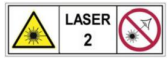
● Do not install the device if it is found that the device and accessories are damaged, rusted, water ingress, model mismatch, missing parts, etc., when unpacking.
● Avoid storage and transportation in places such as water splashing and rain, direct sunlight, strong electric fields, strong magnetic fields, and strong vibrations.
● Avoid dropping, smashing or vigorously vibrating the device and its components.
● It is forbidden to install the indoor device in an environment where it may be exposed to water or other liquids. If the device is damp, it may cause fire and electric shock hazard.
● Place the device in a place out of direct sunlight and ventilation, away from heat sources such as heaters and radiators.
● In the use of the device, you must be in strict compliance with the electrical safety regulations of the nation and region.
● Use the power adapter provided by the official manufacturer. The power adapter must meet the Limited Power Source (LPS) requirements. For specific requirements, please
refer to the device's technical specifications.
● It is strictly forbidden to wire, maintain, and disassemble the device is powered on.
Otherwise, there is a danger of electric shock.
● Make sure that the device is installed in good condition, the wiring is firm, and the power
supply meets the requirements before powering on the device.
● Looking directly at the device may cause harm to the eyes. Protective measures like wearing protective glasses should be taken in the process of installation, maintenance and debugging.
● If the device emits smoke, odor or noise, please turn off the power and unplug the power cord immediately, and contact the dealer or service center in time.
● It is strictly forbidden for non-professional technicians to detect signals during device operation, otherwise it may cause personal injury or device damage.
● Avoid aiming the lens at strong light such as lighting, sunlight, or laser beams, etc., otherwise the image sensor will be damaged.
● It is forbidden to touch the image sensor directly. If necessary, please moisten a soft clean cloth with alcohol and gently wipe off the dust. When the device is not in use, please add a dust cover to protect the image sensor.
● If the device does not work properly, please contact your dealer or the nearest service center. Never attempt to disassemble the device yourself. We shall not assume any responsibility for problems caused by unauthorized repair or maintenance.
● Caution: If the device has battery, risk of explosion if battery is replaced by an incorrect type. Dispose of used batteries according to the instructions.
● Please dispose of the device in strict accordance with the relevant national or regional regulations and standards to avoid environmental pollution and property damage.
Note
● Check whether the device's package is in good condition, whether there is damage, intrusion, moisture, deformation, etc. before unpacking.
● Check the surface of the device and accessories for damage, rust, bumps, etc. when unpacking.
● Check whether the quantity and information of the device and accessories are complete after unpacking.
● Store and transport the device according to the storage and transport conditions of the device, and the storage temperature and humidity should meet the requirements.
● It is strictly prohibited to transport the device in combination with items that may affect or damage the device.
● The device should not be placed with exposed flame sources, such as lighted candles.
● Please read the manual and safety instructions carefully before installing the device.
● Quality requirements for installation and maintenance personnel:
○ Qualification certificate or working experience in weak current system installation and maintenance, and relevant working experience and qualifications. Besides, the personnel must possess the following knowledge and operation skills.
○ The basic knowledge and operation skills of low voltage wiring and low voltage electronic circuit connection.
○ The ability to comprehend the contents of this manual.
● Do not contact the device with strong acids, alkalis, oils, greases or organic solutions such as thinners.
● Do not expose the device directly to flashlights, high-frequency switch lighting devices, or to sunlight, which may affect the performance.
● Do not impose pressure on the cable end of the device, such as forced bending, pulling, etc.
1.3 Electromagnetic Interference Prevention
● Make sure that the shielding layer of cables is intact and 360° connected to the metal connector when using shielded cables.
● Do not route the device together with other equipment (especially servo motors, highpower devices, etc.), and control the distance between cables to more than 10 cm. Make sure to shield the cables if unavoidable.
● The control cable of the device and the power cable of the industrial light source must be wired separately to avoid bundled wiring.
● The power cable, data cable, signal cable, etc. of the device must be wired separately. Make sure to ground them if the wiring groove is used to separate the wiring and the wiring groove is metal.
● During the wiring process, evaluate the wiring space reasonably, and do not pull the cables hard, so as not to damage the electrical performance of the cables.
● If the device is powered on and off frequently, it is necessary to strengthen the voltage isolation, and consider adding a DC/DC isolation power supply module between the device and the adapter.
● Use the power adapter to supply power to the device separately. If centralized power supply is necessary, make sure to use a DC filter to filter the power supply of the device separately before use.
● The unused cables of the device must be insulated.
● When installing the device, if you cannot ensure that the device itself and all equipment connected to the device are well grounded, you should isolate the device with an insulating bracket.
● To avoid the accumulation of static electricity, ensure that other equipment (such as machines, internal components, etc.) and metal brackets on site are properly grounded.
● Make sure that the connector metal barrier of the device is well connected to the PC and other chassis, and if necessary, copper foil should be used to enhance the grounding effect.
● During the installation and use of the device, high voltage leakage must be avoided.
● Use a figure-eight bundle method if the device cable is too long.
● When connecting the device and metal accessories, they must be connected firmly to maintain good conductivity.
● Use a shielded network cable to connect to the device. If you use a self-made network cable, make sure that the shielding shell at the aviation head is well connected to the aluminum foil or metal braid of the shielding cable.
No comments to display
No comments to display