
12. STEPPER CONTROLS
This chapter describes set up and tuning steps that are particular to stepper amplifiers. The basic operations are listed below. Details follow in the chapter.
 Set Position Limits in Stepper Mode (p. 123).
 Set Encoder Correction Gain (p. 125).
 Tune Stepper Detent Gain (p. 126).
12.1: Stepper Motor Support
CME 2 supports Copley’s stepper amplifier family. Stepper amplifiers can run in stepper mode or servo mode.
This chapter describes controls that can be used to fine-tune a stepper amplifier in stepper mode: Encoder Correction and Detent Compensation Gain. It also describes the screen used in stepper mode to set Position Limits.
When a stepper amplifier is used in servo mode, it operates as a true, closed loop, servo amplifier controlling a stepper motor. After putting the stepper amplifier into servo mode, set it up and tune it just as you would a servo amplifier.
12.2: Position Limits (Stepper Amplifier)
Perform the following steps to set position limits for a stepper amplifier connected to an encoder with Encoder Correction enabled (not operating in Servo mode).
Set Position Limits in Stepper Mode
1  Click to open the stepper Position Limits screen. Click the Trajectory Values tab.
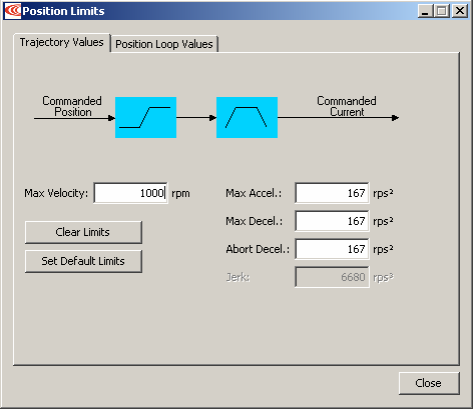
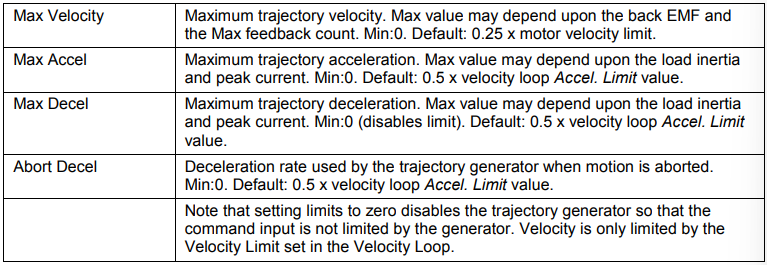
2 Change/verify the values as needed:
3 Click the Position Loop Values tab:
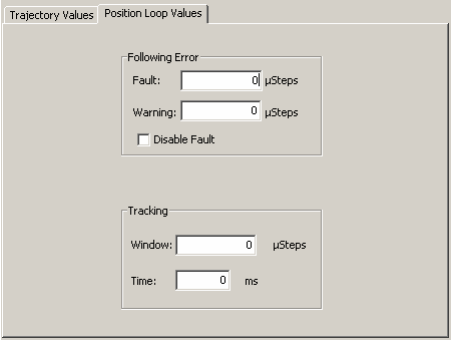
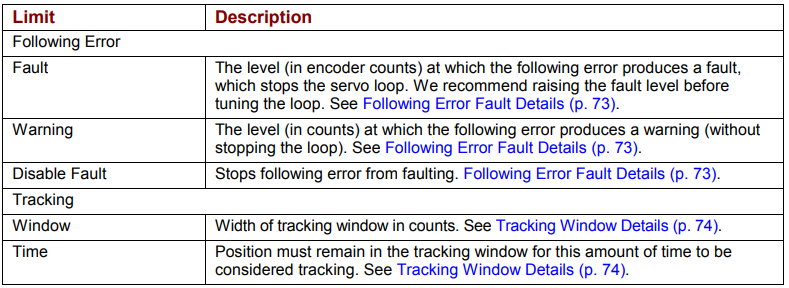
4 Change/verify the values as needed:
5 Click Close to close the window.
6  On the CME 2 Main screen, click Save to Flash
12.3: Encoder Correction
For a stepper motor with an encoder, Encoder Correction proportional gain can be used to compensate for lost microsteps.
Set Encoder Correction Gain
1  Click to open the Encoder Correction screen.
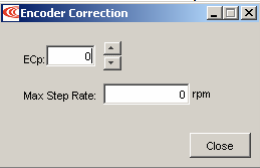
2 Set the Encoder Correction parameters:

12.4: Detent Compensation Gain
Stepper motors are subject to torque detent that can cause undesired velocity fluctuation between full steps of motion. The Detent gain feature can compensate for this detent.
Tune Stepper Detent Gain
1  Click Detent to open the stepper amplifier Advanced Tuning screen.
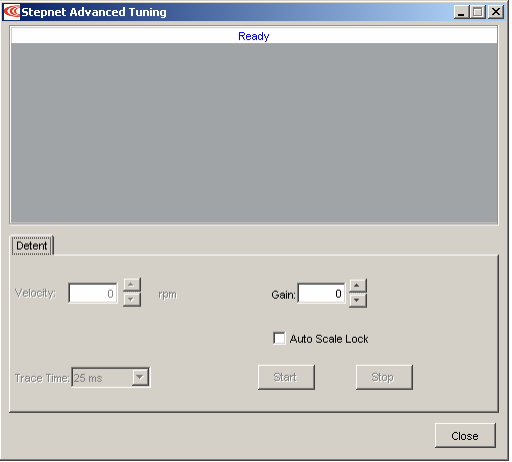
Screen settings and controls are described below:

2 Click Start to begin the tuning.
3 Adjust Velocity from 0 until the mechanical system begins to resonate. (Using a 1.8 degree step motor with 200 full steps, this will typically occur at a velocity of 40-70 rpm.)
4 Adjust Gain until the resonance increases, and then back it down until the resonance is minimized.
5 Click Stop to stop the tuning.
6 Click Close to close the window.
7 On the CME 2 Main screen, click Save to Flash
No comments to display
No comments to display