
Własny ekran startowy HMI (np. logo firmy)
Streszczenie: Własny ekran startowy panelu (np. logo firmy): w Utility Manager lub Project Manager zaznaczyć [Startup screen] w oknie Download, wskazać obraz i pobrać do HMI. Nie dotyczy serii cMT; w serii i wymaga firmware 20090415 lub nowszego.
EN: How to customize the HMI startup screen (e.g. company logo) via the Startup screen option in Download (not for cMT).
Dotyczy: panele HMI Weintek (bez serii cMT; seria i od firmware 20090415)
Źródło: Weintek FAQ (materiały producenta), oryginalny tytuł: „Customize Startup Screen”
The startup screen on HMI can be customized, for example, putting the trademark logo. The following steps show how to do that. Please note that this feature is not available for cMT Series.
For i Series HMI, this feature is only available for firmware version 20090415 and later versions.
Step 1. Run Utility Manager or Project Manager, and then click [Download] button.
Step 2. Select [Startup screen] check box in Download dialog box, and then browse for the image that will be used as the startup screen on HMI.
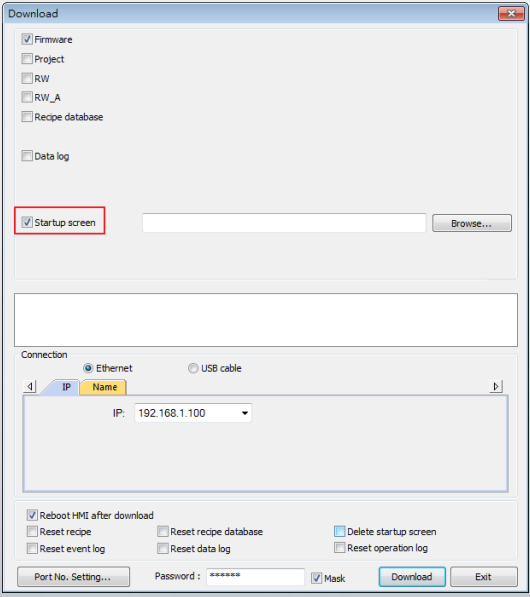
Step 3. Click [Download] button. After download, restart HMI. The selected
image should be displayed during startup.
Słowa kluczowe
ekran startowy, startup screen, logo, boot screen, Utility Manager, Project Manager, Download, obraz startowy, Customize Startup Screen
No comments to display
No comments to display