
22. How to uncompress file?
This FAQ introduces how to uncompress .ecmp / .cmp file to .emtp / .mtp file, and then edit the file in EasyBuilder Pro.
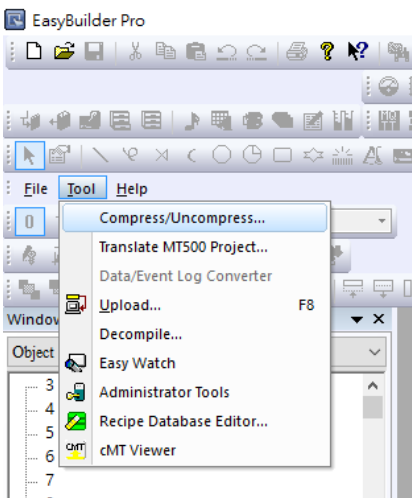
Step 1. Open EasyBuilder Pro, and click [Tool] » [Compress/Uncompress].
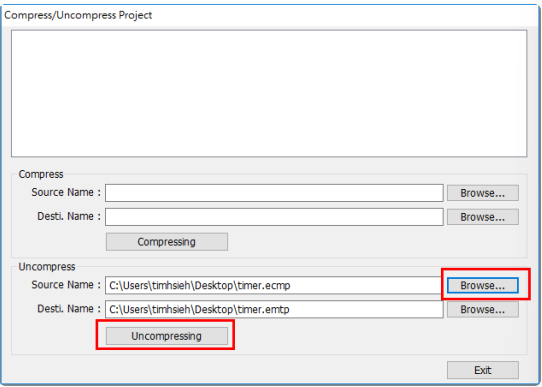
Step 2. When the dialog box pops up, click [Browse] to open the desired file (*.ecmp or *.cmp), and designate the destination directory. Choose [Uncompressing] to process extraction.
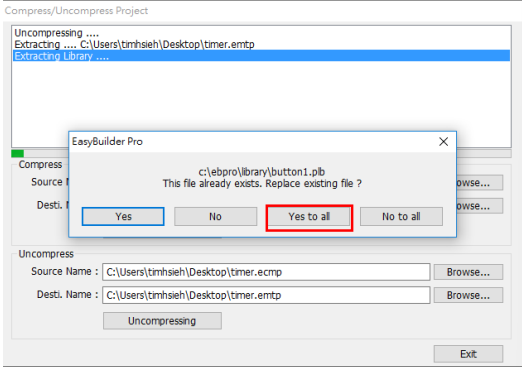
Step 3. Because the files of older version has already existed, just click [Yes to all] to replace it.
Step 4. After uncompressing file is done successfully, the *.emtp file can be found in the designated directory. Now you can open the file in EasyBuilder Pro and edit it.

No comments to display
No comments to display