
42. Recipe Format
Set RW0~RW4 to 16-bit unsigned, RW5~RW13 to 32-bit unsigned
1. Set the data format in Recipe Editor.
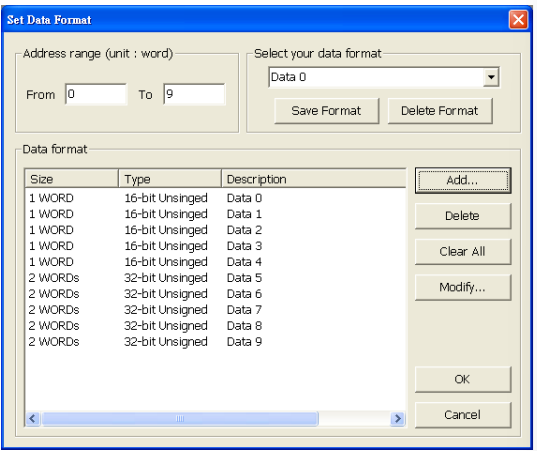
2. The Data are shown below. Data 0~Data 4 are the contents of addresses RW0~RW4. Data5~Data9 are the contents of addresses RW5~RW13.
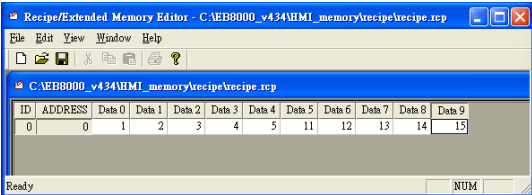
3. The formats seen in HEX edit are listed; low bytes first, high bytes follow.
RW0 = 01 00
RW1 = 02 00
RW2 = 03 00
RW3 = 04 00
RW4 = 05 00
RW5 = 0B 00 00 00
RW7 = 0C 00 00 00
RW9 = 0D 00 00 00
RW11 = 0E 00 00 00
RW13 = 0F 00 00 00

Transmitting Recipe File
1. Input ftp address and password, in this example HMI IP is 192.168.1.103, password 111111. EX: ftp://uploadhis:111111@192.168.1.103
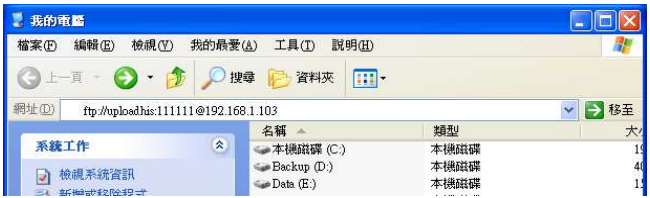
2. Click Enter, HMI history records will be shown, the recipe folder is included.
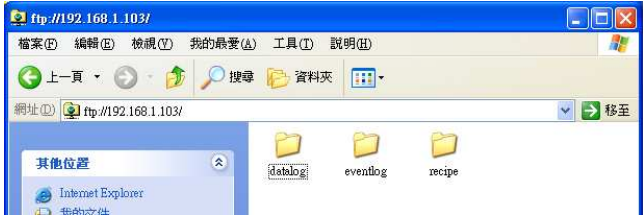
3. Copy the newly built recipe.rcp into recipe folder to finish updating
No comments to display
No comments to display