
57. MT6050iB2 / MT8050iB2 Battery Replacement
How to Replace Battery of MT6050iB2 / MT8050iB2?
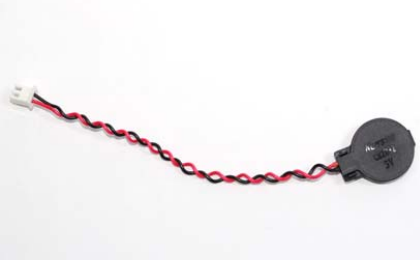
The MT6050iB2 and MT8050iB2 series take one CR2032 lithium button battery (with wires) to keep the RTC running. Battery specification: CR2032 3V lithium battery.
Steps for battery replacement:
Step 1. Turn off the HMI and open its rear cover.
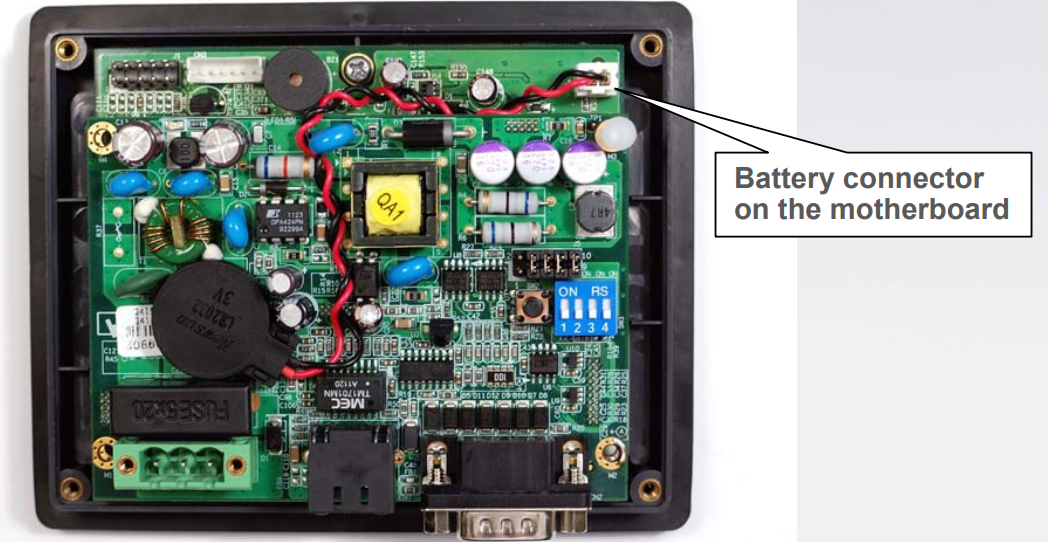
Step 2. Unplug the battery wire of the battery ran out.
Step 3. Plug the new battery into the motherboard via the white connector.
Step 4. Put on the rear cover.
Step 5. Reset the RTC time.
Reading Battery Voltage
EasyBuilder provides LW-9008 (32bit-float): battery voltage for detecting battery voltage. If the value of voltage is lower than 2.8, please replace the battery.
No comments to display
No comments to display