
71. How to Connect HMI VNC Server via Web Browser?
When connecting HMI VNC Server via web browser, since Java APP is used, the security settings in Java will influence the VNC connection. This FAQ explains how to change Java setting.
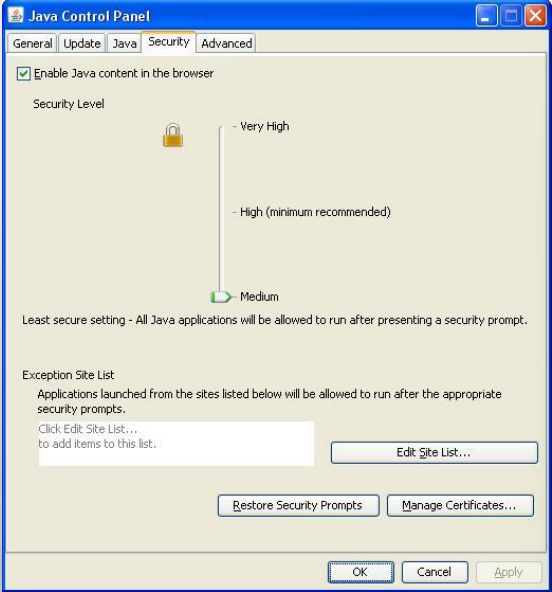
Go to Windows Control Panel and click Java to open Java Control Panel. Go to [Security] tab; adjust Security Level to “Medium”. You can now connect HMI VNC Server
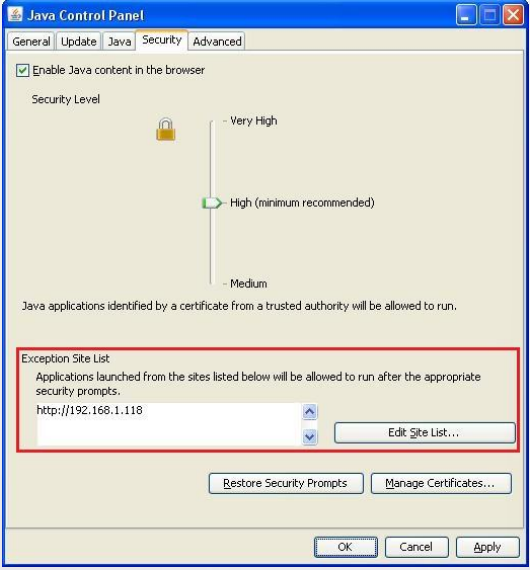
Another way is to click [Edit Site List…], add the HMI IP to be connected, for example, http://192.168.1.118 as shown in the following figure. Directly adding the IP address allows adjusting to a higher security level without being influenced by Java setting.
No comments to display
No comments to display