
27. Criterion of saving the data to HMI memory and external device
● Data under Real time mode will be lost if HMI shut down. (Real time means no settings in history files storage location)
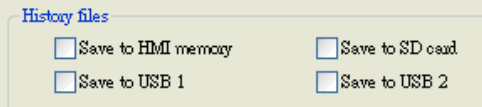
● If users save the History files of Data log and Event log to HMI memory, The data can be saved when the size of data is more than 4kb, otherwise, users need to use [LB9034: save event/data log to HMI, USB disk, CF card (set ON)] to force the data to be stored.
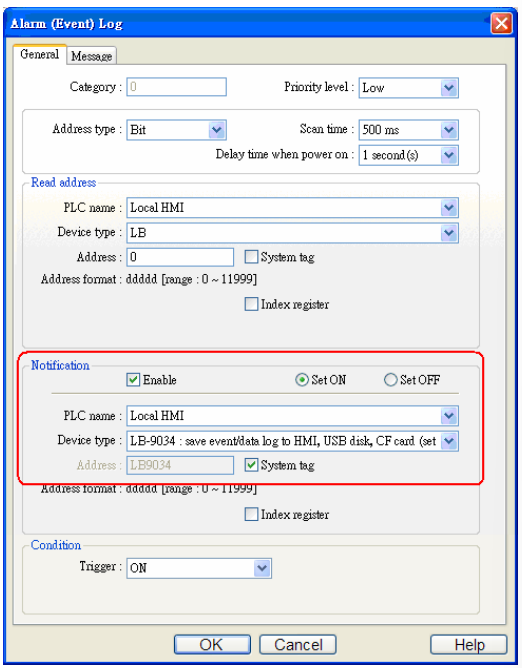
There is a way to trigger LB9034 automatically. Users can set Notification on event log, when an event occurs; the LB9034 will set ON to save event log to HMI memory automatically. The setting is as the following:
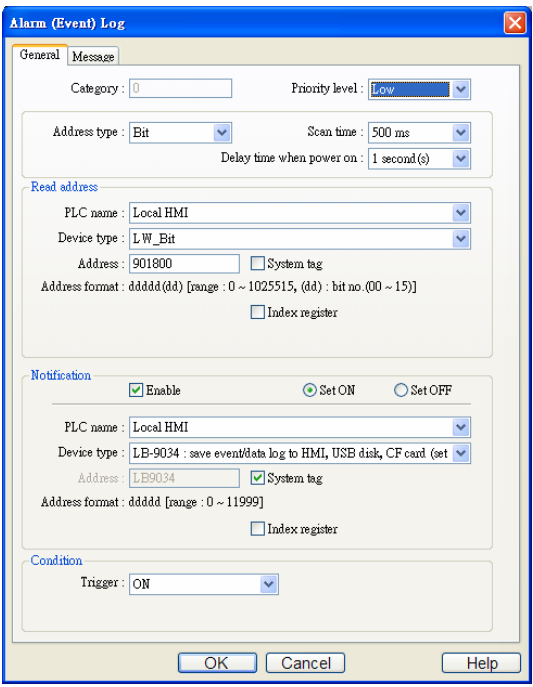
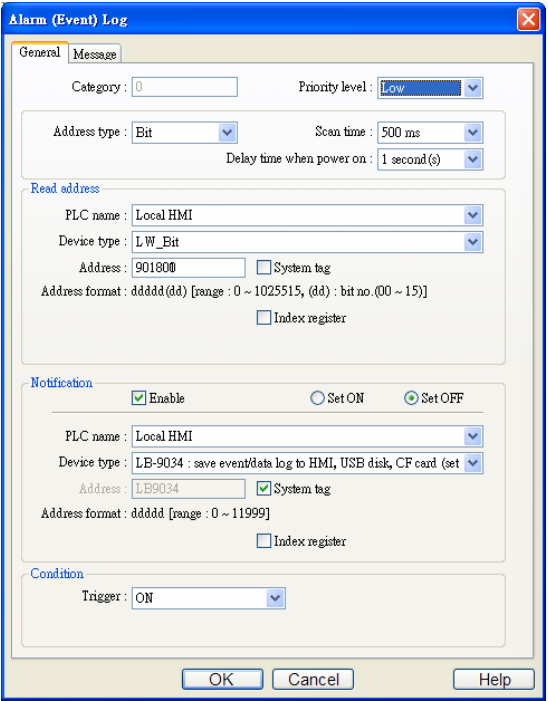
Hint: Users can set LW_bit 901800 to trigger LB9034 every two minutes as pictures below.
● If users save the History files of Data log and Event log to external device, such as USB disk or SD card, the data can be saved immediately.
● The EM data is saved in external devices, so EM data can be saved immediately.
● In order to prolong the life span of HMI flash memory, the system will check the addresses of Recipe every minute, if Recipe Data has changed, system will automatically save the file to flash to avoid losing the data when HMI shut down.
EB8000 provides users with [LB9029: save all recipe data to machine (set ON)] system register bit function to save Recipe Data manually. EB8000 will save Recipe Data when users set ON to [LB9029].
No comments to display
No comments to display