
37. How to backup a project?
An EasyBuilder Pro project contains the source project file (*.mtp), and a number of library files (*.flb, *.blb, *.plb, *.slb, *.snd, *.lbl, and *.glb). These can be individually copied to another location for archiving, or to select the Compress/Uncompress option from EasyBuilder Pro's Tools menu
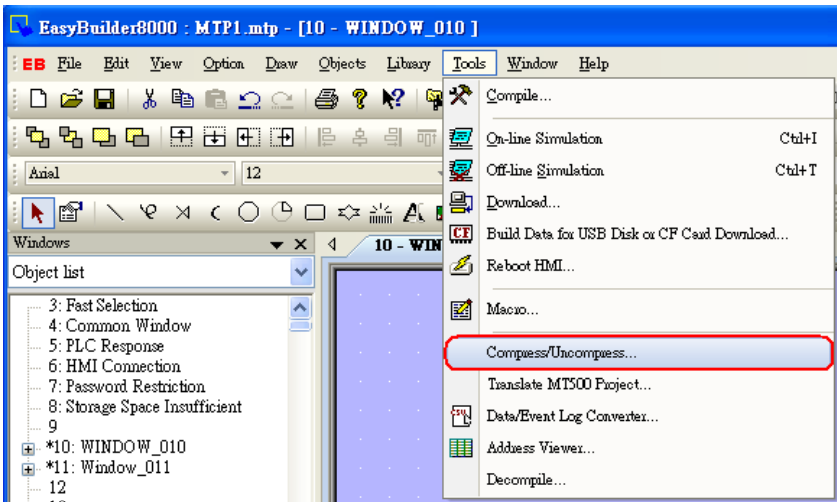
Step 1.
Click Compress/Uncompress from Tools menu.
Step 2.
The following dialog is displayed. Click “Browse” to select source project for archiving.
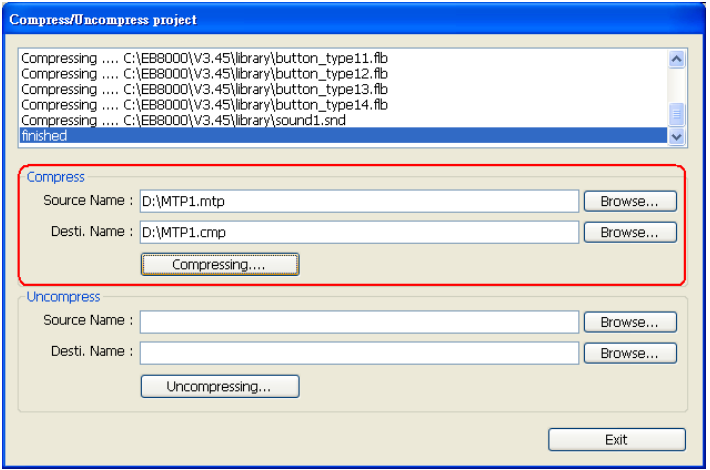
All of the files associated with the project are compressed into a file, with a name of the form *.cmp. The compressed CMP file can be properly archived when this step is successfully completed.
No comments to display
No comments to display